Discussion
Loading...

Post

Log in
  • About
  • Code of conduct
  • Privacy
  • Users
  • Instances
  • About Bonfire
Neil Brown
Neil Brown
@neil@mastodon.neilzone.co.uk  ·  activity timestamp 2 months ago

# "Using LibreOffice and other Free software for documents as a lawyer"

I was asked recently about how I get on using LibreOffice for document-related legal work, and I promised to write down some thoughts.

The short answer is that I use a mix of LibreOffice and other FOSS tools, and I’m very positive about it, with no particular concerns.

If you have questions, please do ask!

https://neilzone.co.uk/2025/11/using-libreoffice-and-other-free-software-for-documents-as-a-lawyer/

#LibreOffice #Linux #FOSS #lawfedi #vim #git #Markdown

Using LibreOffice and other Free software for documents as a lawyer

I was asked recently about how I get on using LibreOffice for document-related legal work, and I promised to write down some thoughts.
⁂
More from
Neil Brown
  • Copy link
  • Flag this post
  • Block
HighlandLawyer
HighlandLawyer
@HighlandLawyer@mastodon.social replied  ·  activity timestamp 2 months ago

@neil
I was working on transferring my document assembly system from MS Office to LibreOffice, but didn't continue after I left private practice. If LibreOffice is getting used in enough law firms, I might consider going back & finishing it off.

  • Copy link
  • Flag this comment
  • Block
Christian Schwägerl
Christian Schwägerl
@christianschwaegerl@mastodon.social replied  ·  activity timestamp 2 months ago

@neil I’d love to use Libre but a surface design that takes me back to the 1990s really puts me off. Is there a way to modernise appearance? (I’ve tried all tricks I’ve found but it still looks like Nirvana is in the charts)

  • Copy link
  • Flag this comment
  • Block
lproven
lproven
@lproven@social.vivaldi.net replied  ·  activity timestamp last month

@christianschwaegerl @neil

> surface design that takes me back to the 1990s

That is one of the appealing features for me.

Function *ALWAYS* must rank higher than form. What a tool does objectively matters more than how it looks.

Flat appearances, ribbons, pointing-device centric UIs that are less convenient to drive with the keyboard... these are all functional impairments. They all make things harder to find: as a reader, I want *text,* and graphics are an order of magnitude more difficult to search through.

I want standard keyboard shortcuts, which means IBM CUA.

I want buttons with borders around them so I can immediately distinguish buttons from labels from fields that expect to be filled.

It seems to me that "flat design" was the creation of people who thought that a lot of UI was so obvious it didn't need visual hinting.

They were wrong.

  • Copy link
  • Flag this comment
  • Block
lproven
lproven
@lproven@social.vivaldi.net replied  ·  activity timestamp last month

@christianschwaegerl @neil

There are other freeware office suites if you want something that more closely resembles the modern MS products that I personally dislike.

OnlyOffice is FOSS and it looks more twenty-twenties.

The Chinese WPS Office does too. I wrote about them and compared them:

https://www.theregister.com/2023/02/21/onlyoffice_7_3_and_wps_11/

OnlyOffice gets an update – and some fresh plugins, too

If the Ribbon is your sort of thing, penguin-flavored options include this and WPS Office
  • Copy link
  • Flag this comment
  • Block
mangeurdenuage :gnu: :trisquel: :gondola_head: 🌿 :abeshinzo: :ignutius: :descartes: :stargate:
@mangeurdenuage@shitposter.world replied  ·  activity timestamp last month
@lproven @christianschwaegerl @neil
Your browser does not support the video tag.
  • Copy link
  • Flag this comment
  • Block
lproven
lproven
@lproven@social.vivaldi.net replied  ·  activity timestamp last month

@christianschwaegerl @neil

SoftMaker Office is Linux-native and ribbon-driven, and it's German. Not FOSS though.

https://www.softmaker.com/en

  • Copy link
  • Flag this comment
  • Block
Stuart Longland (VK4MSL)
@stuartl@mastodon.longlandclan.id.au replied  ·  activity timestamp last month

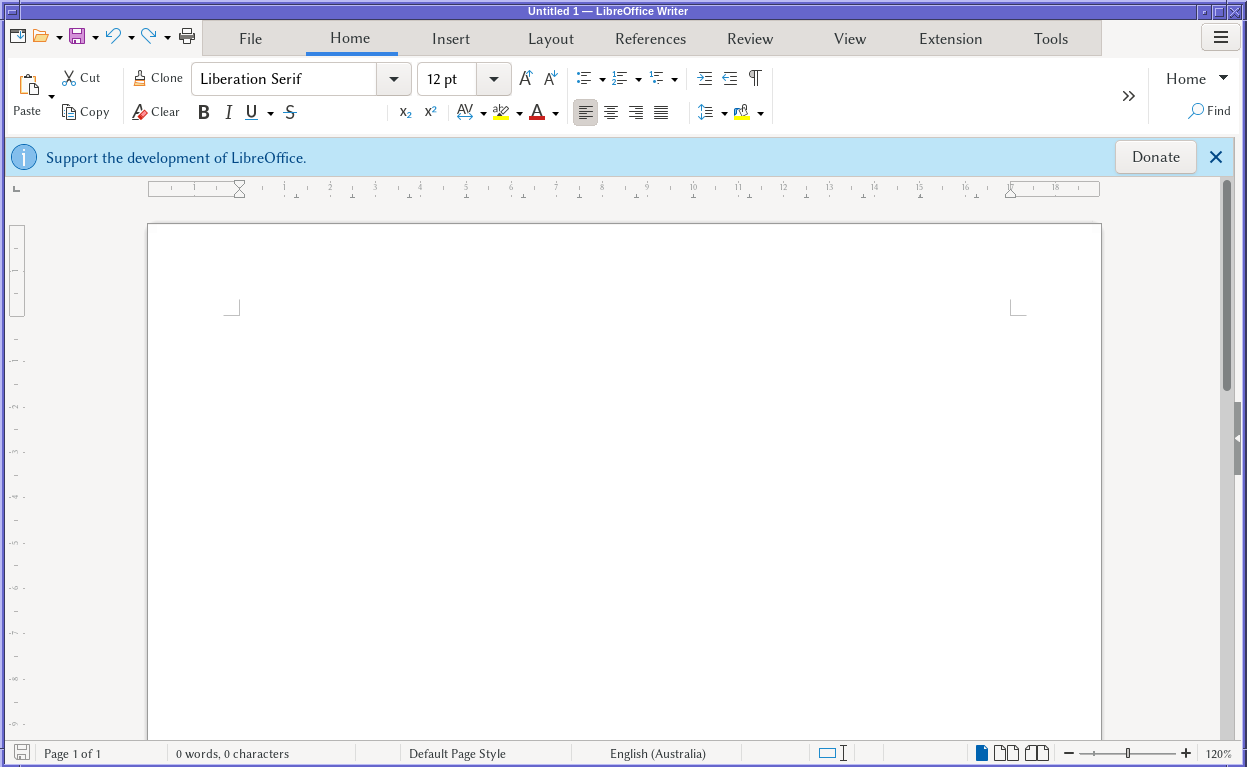
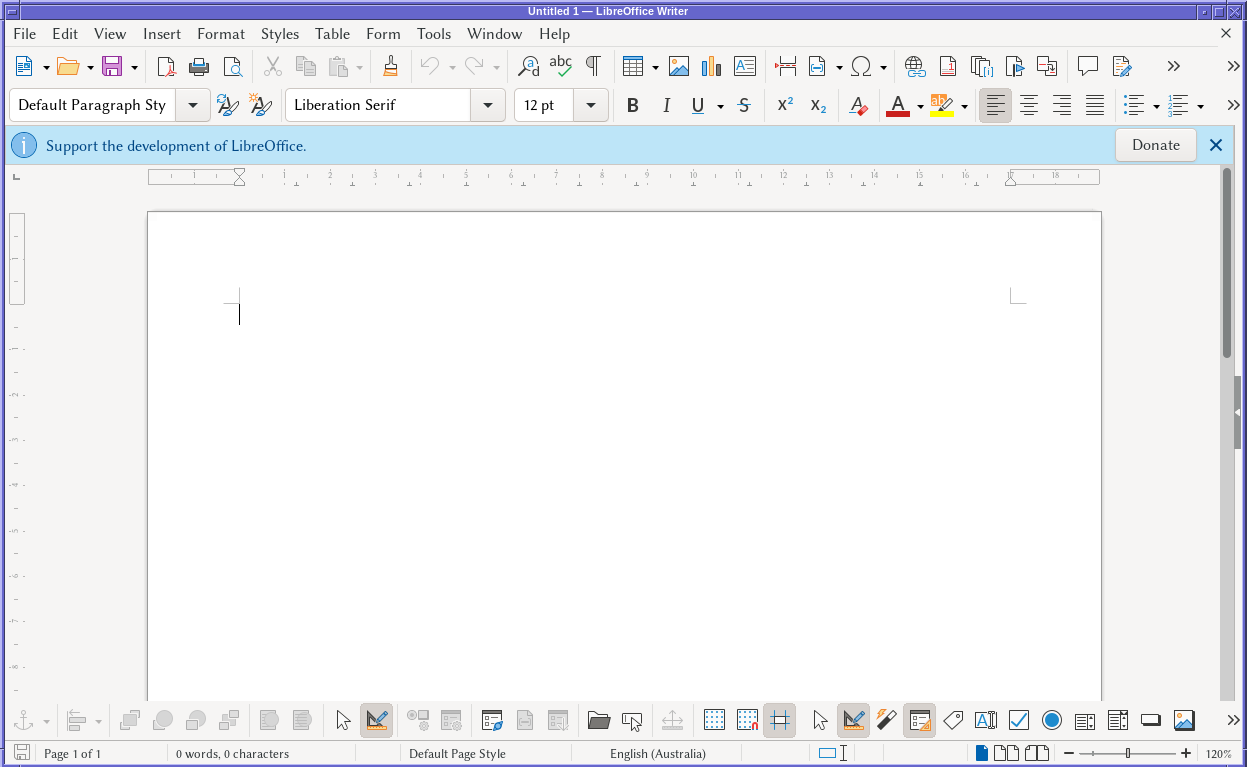
@christianschwaegerl @neil Truth be told… the modern designs in my opinion are a backward step… but LibreOffice gives you the choice.

It's not forced upon you.

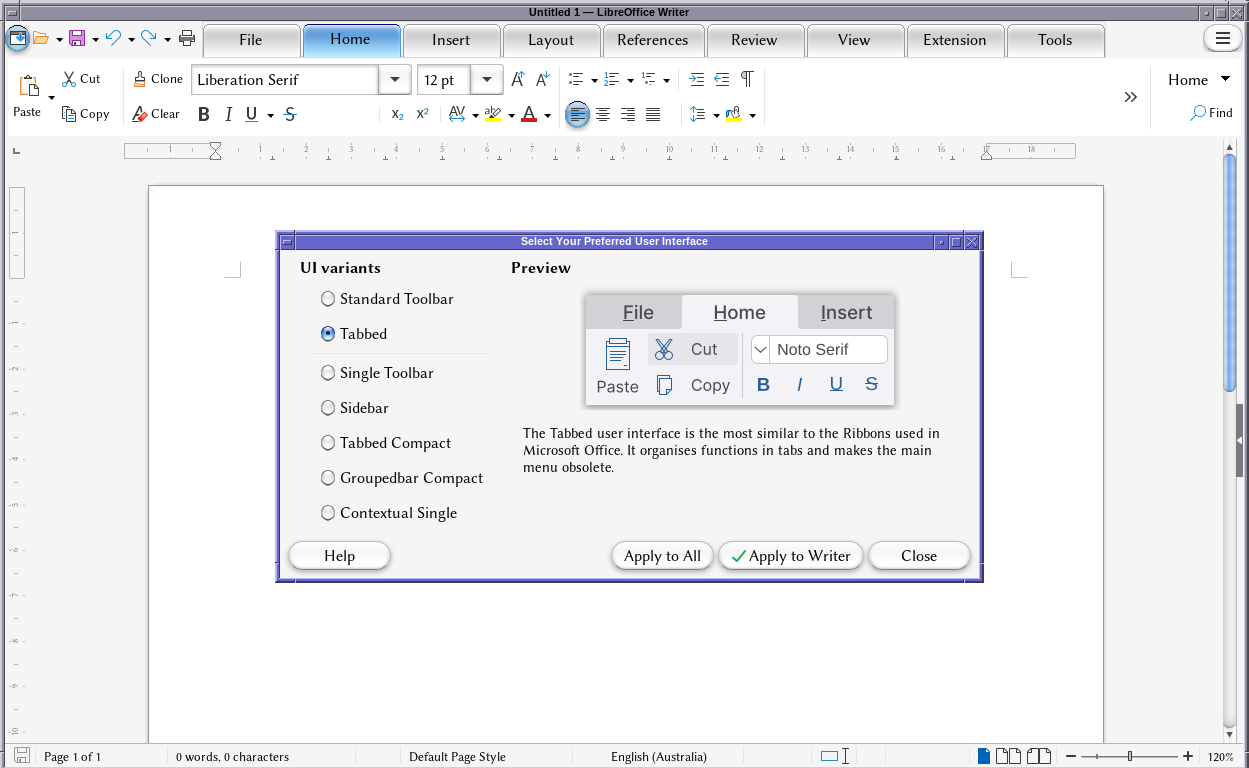
LibreOffice in the "tabbed" view… doing its Microsoft Office 2012 impersonation.
LibreOffice Writer in the "Standard Toolbar" view.  Looks very much like Word did circa 2002 or so.
LibreOffice Writer in the "Standard Toolbar" view. Looks very much like Word did circa 2002 or so.
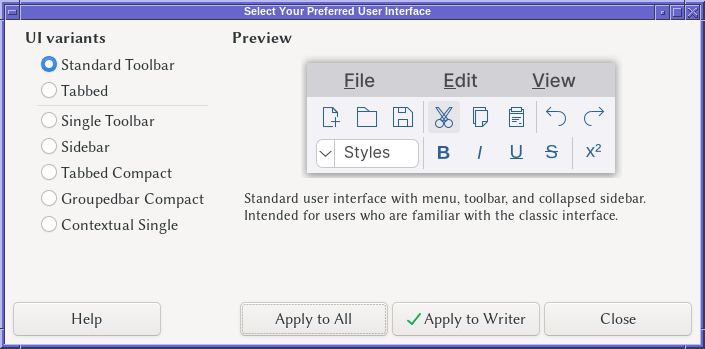
"Select Your Preferred User Interface" dialogue box.

There are options here for:
- Standard Toolbar
- Tabbed
- Single Toolbar
- Sidebar
- Tabbed Compact
- Groupedbar Compact
- Contextual Single
"Select Your Preferred User Interface" dialogue box. There are options here for: - Standard Toolbar - Tabbed - Single Toolbar - Sidebar - Tabbed Compact - Groupedbar Compact - Contextual Single
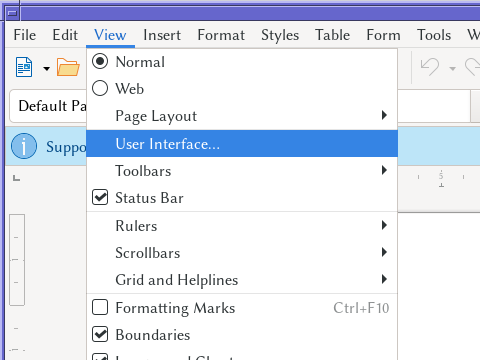
The view menu (in the standard "classical" view) showing the "User Interface…" menu item.
  • Copy link
  • Flag this comment
  • Block
Stuart Longland (VK4MSL)
@stuartl@mastodon.longlandclan.id.au replied  ·  activity timestamp last month

@christianschwaegerl @neil

Took me a while to find a suitable theme that both (1) worked on modern GTK+ and (2) looked sufficiently different enough to make a point. (Most of the current themes all try to copy the modern "flat" look, which is not much different from the GTK+ Adwaita theme. A lot of older themes are for GTK+2 and earlier.)

What you see here, is this theme: https://github.com/B00merang-Project/Mac-OS-X-Cheetah

There are lots of themes out there… I was able to install that by unpacking the archive in `~/.themes` then using `lxappearance` (from the LXDE desktop) to configure it.

LibreOffice Writer on Linux, but this time with a MacOS X Cheetah theme so it's replicating the 2003-era Macintosh "glass" UI effects with the tabbed LibreOffice layout.

This is closer to how Microsoft Office looked circa 2007 or so.
LibreOffice Writer on Linux, but this time with a MacOS X Cheetah theme so it's replicating the 2003-era Macintosh "glass" UI effects with the tabbed LibreOffice layout. This is closer to how Microsoft Office looked circa 2007 or so.
  • Copy link
  • Flag this comment
  • Block
Stuart Longland (VK4MSL)
@stuartl@mastodon.longlandclan.id.au replied  ·  activity timestamp last month

@christianschwaegerl @neil Another factor to consider… LibreOffice behind the scenes uses the GTK+ toolkit for its UI.

So its appearance is also controlled by whatever GTK+ theme you're using. Some desktop environments (e.g. XFCE) have a configurator for setting the GTK+ theme … and once set, LibreOffice will pick that up and use it.

Behind the scenes, these tools manipulate a `settings.ini` file… on my machine (Linux) I found this file in `${HOME}/.config/gtk-4.0/settings.ini`. On Windows there are some hints in this post… https://stackoverflow.com/a/39041558. No idea what Apple uses, but given its POSIX, it will probably be similar to what Linux and BSD do.

  • Copy link
  • Flag this comment
  • Block
viharm
viharm
@viharm@twit.social replied  ·  activity timestamp 2 months ago

@neil
I've recently started using #LibreOffice in anger, & am truely amazed at how far it has come.

The preset styles are so much better than Word's. I found that you can apply styles in a heirarchy ( paragraph > list > character )

  • Copy link
  • Flag this comment
  • Block
Karl Auerbach
Karl Auerbach
@karlauerbach@sfba.social replied  ·  activity timestamp 2 months ago

@neil I don't use LibreOffice for legal documents, but I do use it frequently for technical documentation (containing images and charts).

(I use LO on Linux [Fedora/KDE] and MacOS [Tahoe] - I no longer have any Windoz machines.)

My issue with LO is it is not what-you-see-is-what-you-get. I find that I can not trust the on-screen layout to exactly model what will land on the paper. I still have need to put stuff on paper, sometimes to send out to a printer for mass reproduction which is a process that calls for reliable and accurate screen-to-paper fidelity.

(It is rather ironic that one of the long-lived, and never really fixed, bugs in LO is that its print dialog is often too large to fit onto the screen of a Macbook Pro - often it is so large that the actual "print" button is neither visible nor reachable.)

  • Copy link
  • Flag this comment
  • Block
Moe Lassus
Moe Lassus
@moelassus@mastodon.social replied  ·  activity timestamp 2 months ago

@neil great article. I was an Office user since before it was called Office. Since retiring I’ve switched to LibreOffice. Other than retraining long standing muscle memory, the transition has been remarkably easy. Getting my wife to endure the transition was by far the more difficult task. 😜

Not having to constantly opt out of crap I don’t like is a refreshing change.

  • Copy link
  • Flag this comment
  • Block
Jennifer C J Radtke
Jennifer C J Radtke
@RadtkeJCJ@mastodon.scot replied  ·  activity timestamp 2 months ago

@neil this is interesting - thanks for sharing.

A question - do you ever uses forms in documents? Checkboxes and the like? This is probably the area I have the most trouble, apart from formatting issues. Many people I work with do not know how or why to use styles.

Also videos in presentations - which is hard enough to get working on my own laptop, and stressful every time I need to make it work on someone else's. But it sounds like you avoid that one :)

  • Copy link
  • Flag this comment
  • Block
boredsquirrel
boredsquirrel
@Rhababerbarbar@tux.social replied  ·  activity timestamp 2 months ago

@neil

The only tool lawyers should be allowed to use... secrecy and things, impossible when using spyware

  • Copy link
  • Flag this comment
  • Block
Jupiter
Jupiter
@avoca@gladtech.social replied  ·  activity timestamp 2 months ago

@neil

A lawyer huh...

  • Copy link
  • Flag this comment
  • Block
John McLear
John McLear
@johnmclear@mastodon.green replied  ·  activity timestamp 2 months ago

@neil I'm the same RE Etherpad, it's not a huge technical debt and it's probably a few clicks for me to install and maintain it but I just don't use it enough to warrant the few clicks.. That said, if Mozilla gets their email SaaS offer right I might be able to finally ditch my google workflows..

  • Copy link
  • Flag this comment
  • Block
SamuelJohnson
SamuelJohnson
@samueljohnson@mstdn.social replied  ·  activity timestamp 2 months ago

@neil FWIW I always install these fonts to ensure kerning and pagination compatibility

https://wiki.debian.org/SubstitutingCalibriAndCambriaFonts

Apart from which I had occasional issues exchanging documents with tables.

  • Copy link
  • Flag this comment
  • Block
restorante
restorante
@restorante@social.linux.pizza replied  ·  activity timestamp 2 months ago

@neil

I am curious about the percentage of your clients that want to have the documents on Cryptpad or Etherpad.

I am surprise non-tech people using Cryptpad, Etherpad (or Turtl).

  • Copy link
  • Flag this comment
  • Block
David Chisnall (*Now with 50% more sarcasm!*)
@david_chisnall@infosec.exchange replied  ·  activity timestamp 2 months ago

@neil

I'd like to see the converse 'I use MS Office and this is how I deal with my legal requirements under attorney-client privilege' article. Because I've never met a lawyer who could actually answer that one.

  • Copy link
  • Flag this comment
  • Block
Tris
Tris
@tris@chaos.social replied  ·  activity timestamp 2 months ago

@david_chisnall @neil On an unrelated notes I recently came across a news article that India Government switched from open source suite to proprietary one and advising Government employees against using open source softwares

  • Copy link
  • Flag this comment
  • Block
Linker3000
Linker3000
@linker3000@mastodon.social replied  ·  activity timestamp 2 months ago

@neil Writer is my daily driver when I am not using a customer-provided alternative. It works well 99% of the time, but the odd .docx doesn't render some elements correctly or in the right position and I sometimes find that font spacing / kerning differs so that 'tight' blocks of text overspill where they are intended to be. The biggest issue is knowing where an option is in Word and having a bit of a hunt to find the equivalent in Writer.

  • Copy link
  • Flag this comment
  • Block
tautology
tautology
@tautology@infosec.exchange replied  ·  activity timestamp 2 months ago

@neil I really don't get the hate for LibreOffice, which mainly seems to be "It's not MS Office".

I moved to StarOffice (then OOO, then Libre) in the early 00s and have used it for multiple non-trivial tasks, including degree level maths assignments and my astrophysics dissertation. It has some quirks, but so does MS Office.

My big use of Calc was to turn an equation into a spreadsheet, so I could triple check my working through the process.

  • Copy link
  • Flag this comment
  • Block
tanavit
tanavit
@tanavit@toot.aquilenet.fr replied  ·  activity timestamp 2 months ago

@neil

I guess LibreOffice has an internal "versionning" system.

Would you recommend it or not ?

(I agree git is not adapted for LibreOffice.)

  • Copy link
  • Flag this comment
  • Block
Oriel Jutty :hhHHHAAAH:
@barubary@infosec.exchange replied  ·  activity timestamp 2 months ago

@tanavit @neil I think it was @cstross who found LibreOffice's change tracking to be good enough (and compatible with MS Word) to work with his publisher on editing a whole book. Not sure how that translates to a legal context.

  • Copy link
  • Flag this comment
  • Block
Christian Schwägerl
Christian Schwägerl
@christianschwaegerl@mastodon.social replied  ·  activity timestamp last month

@hzulla @neil Fully agree and there are many more reasons to avoid MS Office and Apple pages is at least as bad - it’s just that @libreoffice could easily offer sth more modern and somehow doesn’t care.

  • Copy link
  • Flag this comment
  • Block
Hanno Zulla
Hanno Zulla
@hzulla@infosec.exchange replied  ·  activity timestamp 2 months ago

@neil @christianschwaegerl I'm switching between word processors based on the task and often, there's no way for me to figure out where anything is in MS Word, while I find it intuitively in LibreOffice.

Once, I literally spent an eternity figuring out removing yellow highlighting in MS Word because I wasn't prepared that there are two distinct types of yellow highlighting in the software that look the same, act differently and are found in very different non-obvious places of the user interface. (There are a lot of Google hits of people asking for help with the same problem in MS Word, so I'm not the only one who tripped over this.)

Yes, LibreOffice isn't a UI beauty, but MS Word's reputation of being user friendly can only be explained with muscle memory of people who trained on these weird inconsistencies since years and by now are able to stop thinking about them.

  • Copy link
  • Flag this comment
  • Block
Christian Schwägerl
Christian Schwägerl
@christianschwaegerl@mastodon.social replied  ·  activity timestamp 2 months ago

@neil I’m a very visual human being and write text all day. @libreoffice 1990s look unfortunately is a big party-stopper. Glad to hear it works for you!

  • Copy link
  • Flag this comment
  • Block
Jennifer C J Radtke
Jennifer C J Radtke
@RadtkeJCJ@mastodon.scot replied  ·  activity timestamp 2 months ago

@neil I didn't think of doing that for PDF slides. That's a good idea for handouts etc 😊

My problem last time was finding something on the Windows computer that could handle PDF slides with embedded videos. At least on that machine, the answer was no. But I see pandoc converts to PowerPoint. That's pretty ubiquitous, so if the videos work that way then I might have a solution.

  • Copy link
  • Flag this comment
  • Block
Jennifer C J Radtke
Jennifer C J Radtke
@RadtkeJCJ@mastodon.scot replied  ·  activity timestamp 2 months ago

@neil it's interesting that there are a vast number of use cases that are perfectly fine - but the difficulty comes with the odd edge cases, that are probably different for everyone, and easier or harder to handle in different contexts. I'm always on a time limit when I get to a Windows computer and find that the thing I produced doesn't work for instance.

  • Copy link
  • Flag this comment
  • Block
Jennifer C J Radtke
Jennifer C J Radtke
@RadtkeJCJ@mastodon.scot replied  ·  activity timestamp 2 months ago

@neil Thanks 😊

LiberaForms looks very neat for the public type of forms. I will bookmark that 😊 Unfortunately we have a lot of "forms" that are really templates to be filled in between 3-4 people. But they use the forms feature in word/libre office to create checkboxes etc.

reveal.js is excellent and I do use it sometimes. I can't share those though - no internet+copyright issues. I tried PDF slides last time and it didn't go well... I wonder if pandoc might help... things to try :)

  • Copy link
  • Flag this comment
  • Block
Jupiter
Jupiter
@avoca@gladtech.social replied  ·  activity timestamp 2 months ago

@neil

😎

  • Copy link
  • Flag this comment
  • Block
Jupiter
Jupiter
@avoca@gladtech.social replied  ·  activity timestamp 2 months ago

@neil

Haha, just a little sigh of disappointment...

...not my favourite people, lawyer's.

Nothing personal.

  • Copy link
  • Flag this comment
  • Block
restorante
restorante
@restorante@social.linux.pizza replied  ·  activity timestamp 2 months ago

@neil

Ahhh I see. You are a tech lawyer :)

Make sense.

  • Copy link
  • Flag this comment
  • Block

bonfire.cafe

A space for Bonfire maintainers and contributors to communicate

bonfire.cafe: About · Code of conduct · Privacy · Users · Instances
Bonfire social · 1.0.1-alpha.40 no JS en
Automatic federation enabled
Log in
  • Explore
  • About
  • Members
  • Code of Conduct