
Discussion
Loading...

Post

Log in
  • About
  • Code of conduct
  • Privacy
  • Users
  • Instances
  • About Bonfire
candide.xyz
candide.xyz
@candide@vis.social  ·  activity timestamp last year

Not sure if this is a stretch, but has anyone managed to get automated #captions (or CART) and shareable live #transcriptions working with the public #Jitsi Meet instance, even via a third-party app?

https://meet.jit.si

I'm not interested in self-hosting, and I'm open to paid solutions. I know that there are some services that offer a bot that you can invite into your meeting to transcribe, but the ones I've tried don't work with Jitsi (Iist in 🧵)
#accessibility #a11y #videoconferencing

  • Copy link
  • Flag this post
  • Block
candide.xyz
candide.xyz
@candide@vis.social replied  ·  activity timestamp last year

Here's what I've tried so far (unsuccessfully):

- Fireflies: the bot was in the meeting and recording, but there was no live transcript
- OtterPilot
- Tactiq
- Krisp.ai
- Notta Bot
- Meeting Baas Trancript Seeker
- Speechnotes
- Reduct.video

I've used the Help/Contact feature to request Jitsi integrations for all these apps. In the meantime, still on the lookout...

Also looked into Jitsi as a Service (8x8), and that has captions, but it seems to be aimed at developers and app makers.

  • Copy link
  • Flag this comment
  • Block
candide.xyz
candide.xyz
@candide@vis.social replied  ·  activity timestamp last year

I don't need AI summaries, topic tagging, chatbots that can query the notes, etc.

Just need an easy, automated way of generating captions that remote meeting participants can access in real time (no sign-in), and that can (ideally) be displayed alongside the meeting.

It can be...

- a bot I invite to the meeting,
- some kind of desktop app that connects to my mic directly
- a platform that I can livestream the meeting to, and that will display the transcript at a shareable link

  • Copy link
  • Flag this comment
  • Block
candide.xyz
candide.xyz
@candide@vis.social replied  ·  activity timestamp last year

So far, after some days of testing, the only solutions I found are:

- Using a continuous voice typing keyboard app on my Android to transcribe into a Etherpad document, and sharing that.

- Livestreaming the Jitsi meeting to YouTube (auto-captions require 1k subscribers, though)

- Giving up on Jitsi, and just using Zoom / Google Meet / whatever else that has this out of the box

Also, if anyone was using Jitsi and moved to something else entirely, I'd love to hear about those experiences.

  • Copy link
  • Flag this comment
  • Block
candide.xyz
candide.xyz
@candide@vis.social replied  ·  activity timestamp last year

Alrighty, I have a few more leads (because I'm still obsessing over this):

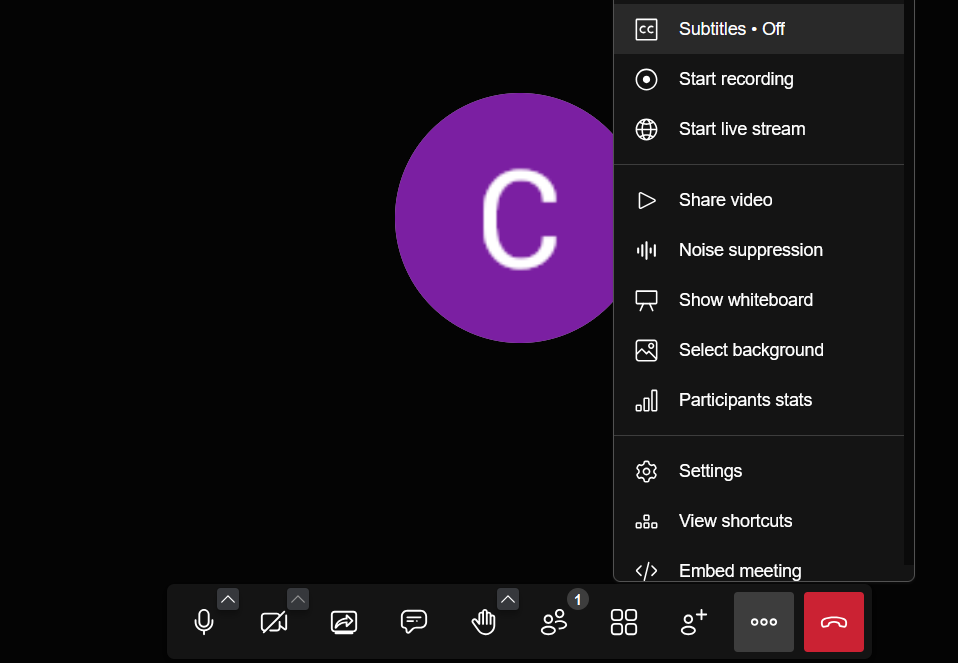
1. I discovered https://beta.meet.jit.si today, and this #Jitsi version has a "Subtitles" button. It only works if the person speaking is using a Chrome-ish browser, but will display on Firefox. That said, it only works for a few mins before failing...

Edit: Turns out I was at the right place at the right time lol, and they have no plans of offering subtitles in the hosted version (https://github.com/jitsi/jitsi-meet/issues/15247)

Screenshot of the beta Jitsi Meet interface, showing the extra toolbar options. The "Subtitles" button is highlighted.
  • Copy link
  • Flag this comment
  • Block
candide.xyz
candide.xyz
@candide@vis.social replied  ·  activity timestamp last year
  1. Another option could be to use #CaptionNinja: https://caption.ninja. It's a #WebCaptioner replacement, and only works on Chrome (and co). Caption Ninja is cool, though, because:

    - it has a live feed that can be shared with others or added into #OBS as a browser source overlay thingie
    - it seems pretty customizable (https://github.com/steveseguin/captionninja),
    - it has a manual text entry mode (for stenographers?)
    - can add speaker labels

    #candidefindings

Your browser does not support the video tag.
This video cannot be previewed
Open original
This screen recording captures a demo I did of Caption Ninja. There are two browser tabs side-by-side. The one on the left is MS Edge, which I'm using to record and capture my voice. Unfortunately, Edge, Chromite, and Chrome seem to be the only browsers which can support this function (Web Speech API tingz, I think). Other Chromium derivatives like Ungoogled and Vivaldi don't work for the input room... On the right, we see the shareable live transcript overlay in an Ungoogled Chromium window. The overlays can be shared with anyone to follow along, and can be imported into OBS as an open caption screen overlay. The overlays can be viewed on all the browsers I tested. I even added an option in the URL to add a speaker label with my name, but that can be turned off. Anyway, if you got this far, drop a 🗣️
  • Copy link
  • Flag this comment
  • Block

bonfire.cafe

A space for Bonfire maintainers and contributors to communicate

bonfire.cafe: About · Code of conduct · Privacy · Users · Instances
Bonfire social · 1.0.1 no JS en
Automatic federation enabled
Log in
  • Explore
  • About
  • Members
  • Code of Conduct