Discussion
Loading...

#Tag

Log in
  • About
  • Code of conduct
  • Privacy
  • Users
  • Instances
  • About Bonfire
Rob Whittaker boosted
Kerrick Long (code)
Kerrick Long (code)
@kerrick@ruby.social  ·  activity timestamp 2 weeks ago

Rooibos has a website! https://rooibos.run

#MVU #TheElmArchitecture #TEA #RatatuiRuby #TUI #TerminalUI #TerminalApps #Ruby #Programming #FunctionalProgramming #ModelViewUpdate #Software #SoftwareEngineering

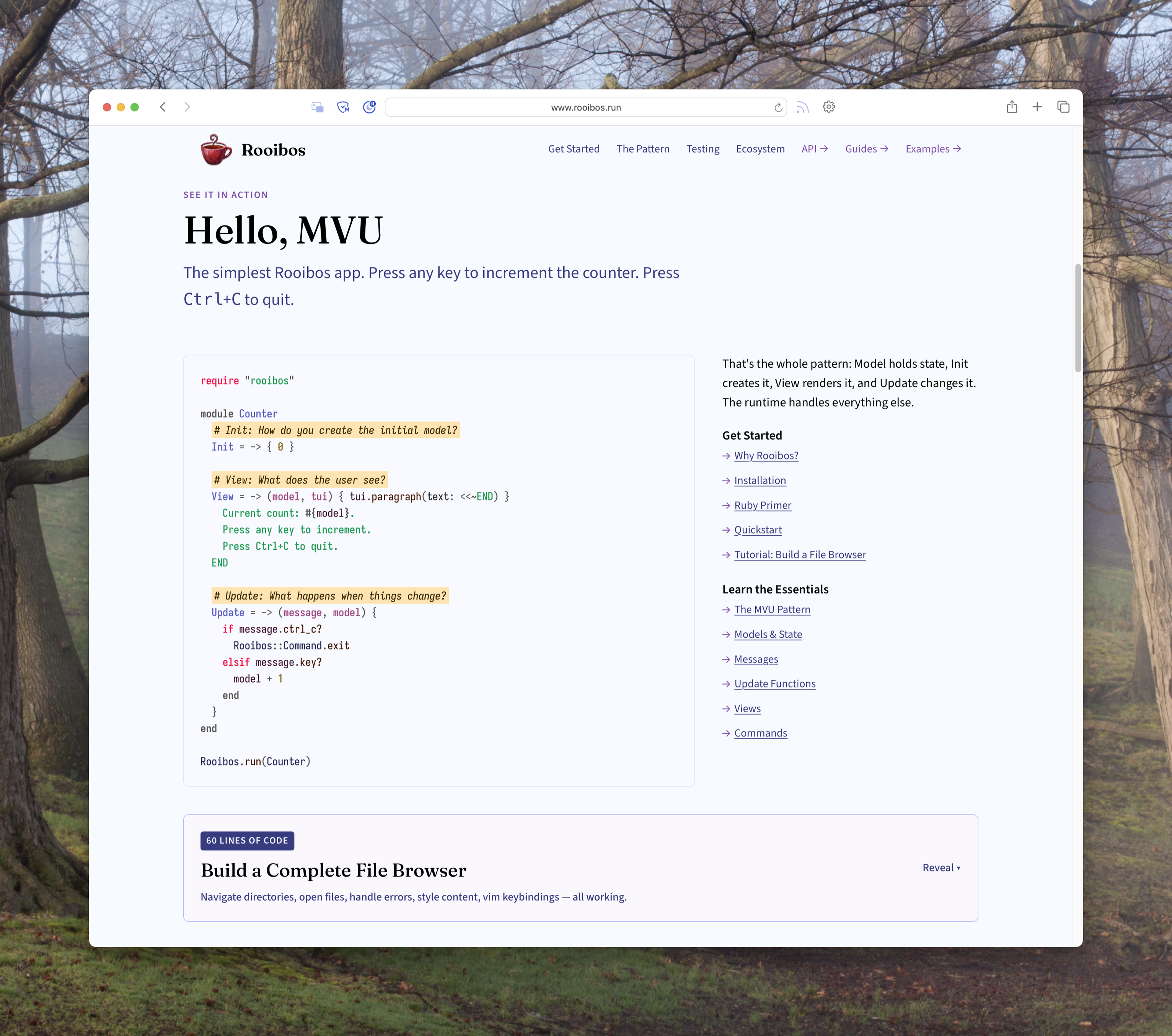
A screenshot of the Rooibos website. The header has a red cup of tea as a logo, with Rooibos and a navigation bar including "Get Started," "The Pattern," "Testing," "Ecosystem," "API ->," "Guides ->," and "Examples ->." The visible part of the webpage says:


See it in action

## Hello, MVU

The simplest Rooibos app. Press any key to increment the counter. Press Ctrl+C to quit.

    require "rooibos"
    
    module Counter
      # Init: How do you create the initial model?
      Init = -> { 0 }
    
      # View: What does the user see?
      View = -> (model, tui) { tui.paragraph(text: <<~END) }
        Current count: #{model}.
        Press any key to increment.
        Press Ctrl+C to quit.
      END
    
      # Update: What happens when things change?
      Update = -> (message, model) {
        if message.ctrl_c?
          Rooibos::Command.exit
        elsif message.key?
          model + 1
        end
      }
    end
    
    Rooibos.run(Counter)

That's the whole pattern: Model holds state, Init creates it, View renders it, and Update changes it. The runtime handles everything else.

#### Get Started

*   Why Rooibos?
*   Installation
*   Ruby Primer
*   Quickstart
*   Tutorial: Build a File Browser

#### Learn the Essentials

*   The MVU Pattern
*   Models & State
*   Messages
*   Update Functions
*   Views
*   Commands

> 60 lines of code Build a Complete File Browser Navigate directories, open files, handle errors, style content, vim keybindings — all working.

A screenshot of the Rooibos website. The header has a red cup of tea as a logo, with Rooibos and a navigation bar including "Get Started," "The Pattern," "Testing," "Ecosystem," "API ->," "Guides ->," and "Examples ->." The visible part of the webpage says: See it in action ## Hello, MVU The simplest Rooibos app. Press any key to increment the counter. Press Ctrl+C to quit. require "rooibos" module Counter # Init: How do you create the initial model? Init = -> { 0 } # View: What does the user see? View = -> (model, tui) { tui.paragraph(text: <<~END) } Current count: #{model}. Press any key to increment. Press Ctrl+C to quit. END # Update: What happens when things change? Update = -> (message, model) { if message.ctrl_c? Rooibos::Command.exit elsif message.key? model + 1 end } end Rooibos.run(Counter) That's the whole pattern: Model holds state, Init creates it, View renders it, and Update changes it. The runtime handles everything else. #### Get Started * Why Rooibos? * Installation * Ruby Primer * Quickstart * Tutorial: Build a File Browser #### Learn the Essentials * The MVU Pattern * Models & State * Messages * Update Functions * Views * Commands > 60 lines of code Build a Complete File Browser Navigate directories, open files, handle errors, style content, vim keybindings — all working.
  • Copy link
  • Flag this post
  • Block
Kerrick Long (code)
Kerrick Long (code)
@kerrick@ruby.social  ·  activity timestamp 2 weeks ago

Rooibos has a website! https://rooibos.run

#MVU #TheElmArchitecture #TEA #RatatuiRuby #TUI #TerminalUI #TerminalApps #Ruby #Programming #FunctionalProgramming #ModelViewUpdate #Software #SoftwareEngineering

A screenshot of the Rooibos website. The header has a red cup of tea as a logo, with Rooibos and a navigation bar including "Get Started," "The Pattern," "Testing," "Ecosystem," "API ->," "Guides ->," and "Examples ->." The visible part of the webpage says:


See it in action

## Hello, MVU

The simplest Rooibos app. Press any key to increment the counter. Press Ctrl+C to quit.

    require "rooibos"
    
    module Counter
      # Init: How do you create the initial model?
      Init = -> { 0 }
    
      # View: What does the user see?
      View = -> (model, tui) { tui.paragraph(text: <<~END) }
        Current count: #{model}.
        Press any key to increment.
        Press Ctrl+C to quit.
      END
    
      # Update: What happens when things change?
      Update = -> (message, model) {
        if message.ctrl_c?
          Rooibos::Command.exit
        elsif message.key?
          model + 1
        end
      }
    end
    
    Rooibos.run(Counter)

That's the whole pattern: Model holds state, Init creates it, View renders it, and Update changes it. The runtime handles everything else.

#### Get Started

*   Why Rooibos?
*   Installation
*   Ruby Primer
*   Quickstart
*   Tutorial: Build a File Browser

#### Learn the Essentials

*   The MVU Pattern
*   Models & State
*   Messages
*   Update Functions
*   Views
*   Commands

> 60 lines of code Build a Complete File Browser Navigate directories, open files, handle errors, style content, vim keybindings — all working.
A screenshot of the Rooibos website. The header has a red cup of tea as a logo, with Rooibos and a navigation bar including "Get Started," "The Pattern," "Testing," "Ecosystem," "API ->," "Guides ->," and "Examples ->." The visible part of the webpage says: See it in action ## Hello, MVU The simplest Rooibos app. Press any key to increment the counter. Press Ctrl+C to quit. require "rooibos" module Counter # Init: How do you create the initial model? Init = -> { 0 } # View: What does the user see? View = -> (model, tui) { tui.paragraph(text: <<~END) } Current count: #{model}. Press any key to increment. Press Ctrl+C to quit. END # Update: What happens when things change? Update = -> (message, model) { if message.ctrl_c? Rooibos::Command.exit elsif message.key? model + 1 end } end Rooibos.run(Counter) That's the whole pattern: Model holds state, Init creates it, View renders it, and Update changes it. The runtime handles everything else. #### Get Started * Why Rooibos? * Installation * Ruby Primer * Quickstart * Tutorial: Build a File Browser #### Learn the Essentials * The MVU Pattern * Models & State * Messages * Update Functions * Views * Commands > 60 lines of code Build a Complete File Browser Navigate directories, open files, handle errors, style content, vim keybindings — all working.
  • Copy link
  • Flag this post
  • Block
Rob Whittaker boosted
Kerrick Long (code)
Kerrick Long (code)
@kerrick@ruby.social  ·  activity timestamp 4 weeks ago

Developer experience has been my consistent focus when #Ratatui #Ruby and its #MVU runtime #Tea (The #Elm Architecture).

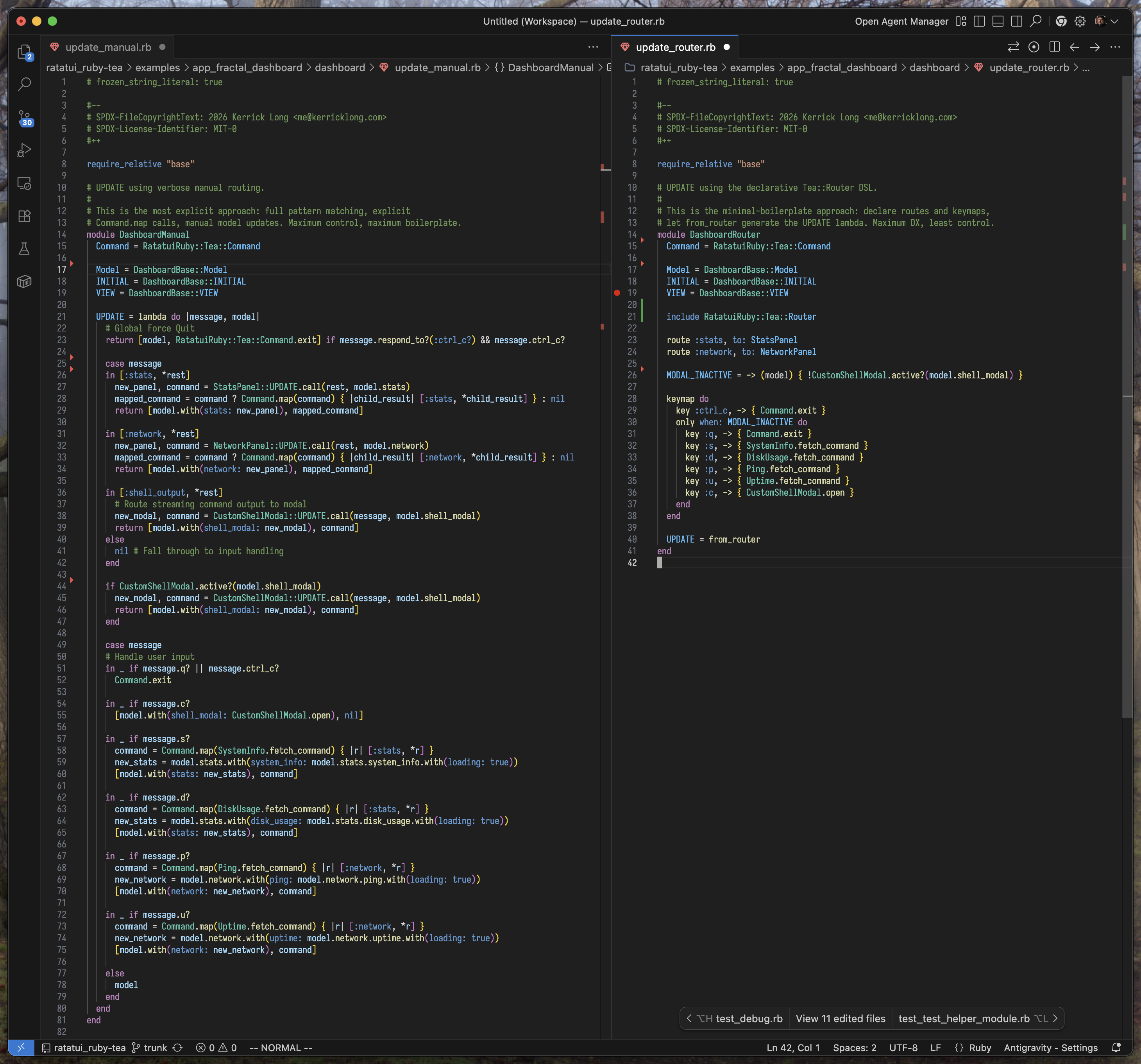
For example, look at this great #Router #DSL! For most cases, this will save you a ton of code and headaches. But when you need full control, you've got it.

Try it now: https://git.sr.ht/~kerrick/ratatui_ruby-tea

Learn more: https://sr.ht/~kerrick/ratatui_ruby/

#DeveloperExperience #DX #TUI #TerminalUserInterface #Software #Functional #Programming #SoftwareEngineering

A screenshot of two similar Ruby files, the one on the left is over 80 lines of code and the one on the right is about 40 lines of code. the one on the left is pretty dense and hard to read at first, the one on the right is pretty clear.

ratatui_ruby: 💎 Unofficial Ruby wrapper for Ratatui 👨‍🍳🐀.

~kerrick/ratatui_ruby-tea -

☕ The Elm Architecture for RatatuiRuby 💎 👨‍🍳🐀. -

sourcehut git

  • Copy link
  • Flag this post
  • Block
Kerrick Long (code)
Kerrick Long (code)
@kerrick@ruby.social  ·  activity timestamp 4 weeks ago

Developer experience has been my consistent focus when #Ratatui #Ruby and its #MVU runtime #Tea (The #Elm Architecture).

For example, look at this great #Router #DSL! For most cases, this will save you a ton of code and headaches. But when you need full control, you've got it.

Try it now: https://git.sr.ht/~kerrick/ratatui_ruby-tea

Learn more: https://sr.ht/~kerrick/ratatui_ruby/

#DeveloperExperience #DX #TUI #TerminalUserInterface #Software #Functional #Programming #SoftwareEngineering

A screenshot of two similar Ruby files, the one on the left is over 80 lines of code and the one on the right is about 40 lines of code. the one on the left is pretty dense and hard to read at first, the one on the right is pretty clear.

ratatui_ruby: 💎 Unofficial Ruby wrapper for Ratatui 👨‍🍳🐀.

~kerrick/ratatui_ruby-tea -

☕ The Elm Architecture for RatatuiRuby 💎 👨‍🍳🐀. -

sourcehut git

  • Copy link
  • Flag this post
  • Block

bonfire.cafe

A space for Bonfire maintainers and contributors to communicate

bonfire.cafe: About · Code of conduct · Privacy · Users · Instances
Bonfire social · 1.0.2-alpha.7 no JS en
Automatic federation enabled
Log in
  • Explore
  • About
  • Members
  • Code of Conduct