Discussion
Loading...

Post

Log in
  • About
  • Code of conduct
  • Privacy
  • Users
  • Instances
  • About Bonfire
Matt
Matt
@matt@oslo.town  路  activity timestamp 5 days ago

RE: https://oslo.town/@matt/116109981885032294

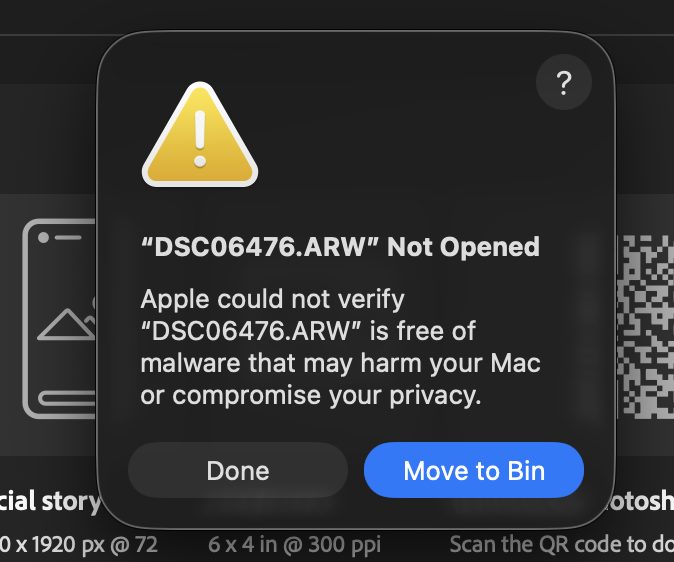
This happened again. Took a bunch of photos today and all of them but two would open. One of them is a nice shot, but I have no way of editing it now because my MacBook decided against it.

I did some digging online and you *should* be able to go to the Security options in Settings and see an unique notification for this alert and press "Open anyway"... but doing that just brings up this dialog again.

I'm stuck in a loop, unable to edit photos of my own family. 馃檭

#Apple #MacBook #Photography

Matt
Matt
@matt@oslo.town  路  activity timestamp 6 days ago

Oh, nice. Apple has decided that I am not allowed to open some of the photos from my Sony camera because... 馃し

  • Copy link
  • Flag this post
  • Block
Tor
Tor
@gisvold@mastodon.gisvold.co.uk  路  activity timestamp 5 days ago

@matt Matt - what version of MacOs are you on? I have ever seen this message when downloading applications - not files? Are your running additional security software (Moonlock)?

Tor

Sorry, no caption provided by author
  • Copy link
  • Flag this comment
  • Block

bonfire.cafe

A space for Bonfire maintainers and contributors to communicate

bonfire.cafe: About 路 Code of conduct 路 Privacy 路 Users 路 Instances
Bonfire social 路 1.0.2-alpha.34 no JS en
Automatic federation enabled
Log in
Instance logo
  • Explore
  • About
  • Members
  • Code of Conduct