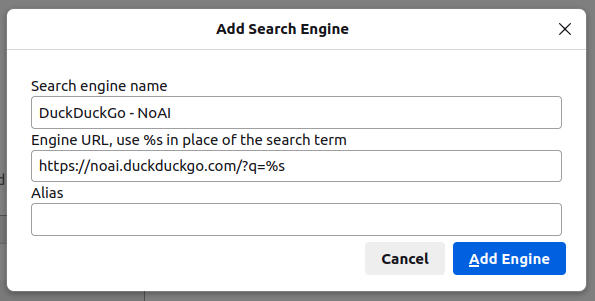

If you are a DuckDuckGo and Firefox/Librewolf user like myself, and want to use DuckDuckGo's new AI-free version in the main bar. Here is how.
1. Go to Settings, click the Search tab, scroll down to Search Shortcuts.
2. Click Add.
3. This part took some experimentation to figure out the correct URL format, but you'll want to fill in the Engine URL line with the following.
https://noai.duckduckgo.com/?q=%s
4. Fill in whatever name or alias you see fit then click Add Engine. You can now scroll up to Default Search Engine in your Search settings and select the no AI version as your default.
Here is what mine looks like.
#Firefox #Librewolf #DuckDuckGo #DuckDuckGoNoAI #NoAI #SearchEngine