Discussion
Loading...

Post

Log in
  • About
  • Code of conduct
  • Privacy
  • Users
  • Instances
  • About Bonfire
shac ron ₪‎
shac ron ₪‎
@shac@ioc.exchange  ·  activity timestamp 3 months ago

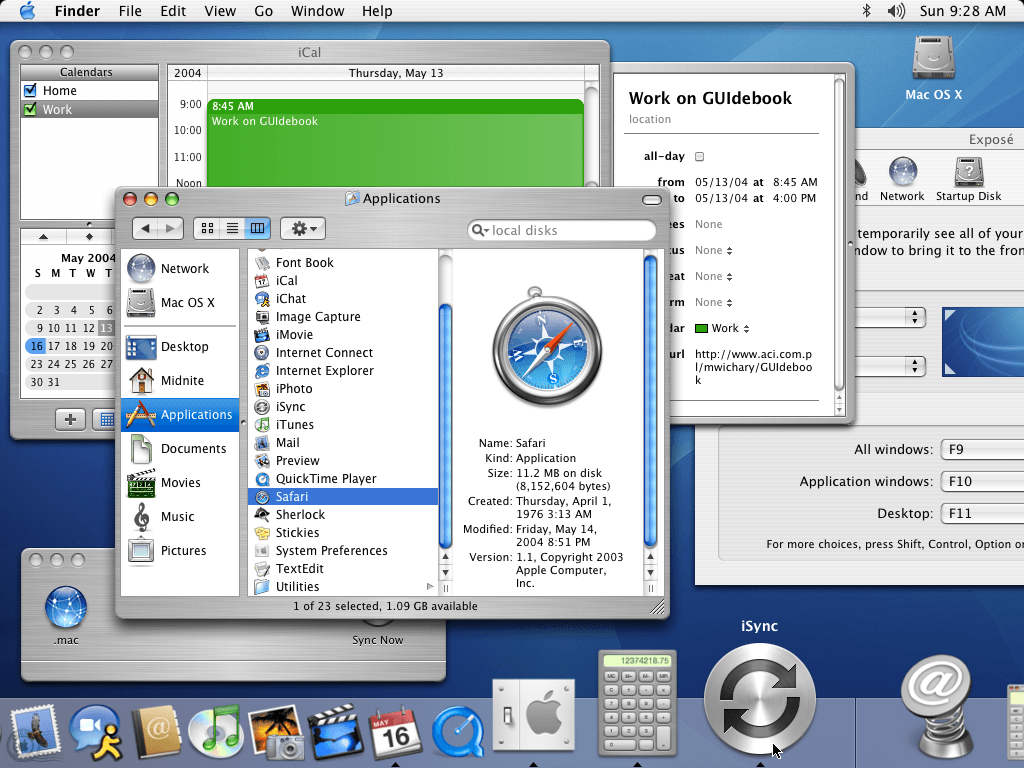
This is #Mac OS Panther, released in 2004. Its UI has many things wrong with it (and is not pretty). But what it does well is a strong and obvious distinction between controls and data. Buttons and borders are clearly defined. Icons are immediately recognizable, even zoomed out and tiny like in this picture. No transparency or blending. Scroll state always obvious through visible bars.

What this adds up to is reduced cognitive load when using the interface. Everything is plain, you can find a thing immediately. This is a stark contrast to #macOSTahoe and the many poor decisions in that UI.
Sorry, no caption provided by author
  • Copy link
  • Flag this post
  • Block
Logging Off Enjoyer
Logging Off Enjoyer
@thomasfuchs@hachyderm.io replied  ·  activity timestamp 2 weeks ago

@shac it’s pretty ¯\_(ツ)_/¯

  • Copy link
  • Flag this comment
  • Block
shac ron ₪‎
shac ron ₪‎
@shac@ioc.exchange replied  ·  activity timestamp 2 weeks ago

@thomasfuchs That’s a legitimate opinion but besides the point. It is very usable.

  • Copy link
  • Flag this comment
  • Block
Logging Off Enjoyer
Logging Off Enjoyer
@thomasfuchs@hachyderm.io replied  ·  activity timestamp 2 weeks ago

@shac yeah no doubt about it. My favorite look is 10.1, my favorite OS version probably 10.6 (Snow Leopard)

  • Copy link
  • Flag this comment
  • Block

bonfire.cafe

A space for Bonfire maintainers and contributors to communicate

bonfire.cafe: About · Code of conduct · Privacy · Users · Instances
Bonfire social · 1.0.2-alpha.2 no JS en
Automatic federation enabled
Log in
  • Explore
  • About
  • Members
  • Code of Conduct