System Administration, Week 1: UNIX History
We're borrowing this video from our "Advanced Programming in the UNIX Environment" class to give a brief summary of the history of the UNIX family of operating systems.
System Administration, Week 1: UNIX History
We're borrowing this video from our "Advanced Programming in the UNIX Environment" class to give a brief summary of the history of the UNIX family of operating systems.
HP-UX hits end-of-life today, and I’m sad
It's 31 December 2025 today, the last day of the year, but it also happens to mark the end of support for the last and final version of one of my favourite operating systems: HP-UX. Today is the day HPE puts the final nail in the coffin of their long-running UNIX operating system, marking the end of another vestige of the heyday of the commercial UNIX vari
https://www.osnews.com/story/144094/hp-ux-hits-end-of-life-today-and-im-sad/
HP-UX hits end-of-life today, and I’m sad
It's 31 December 2025 today, the last day of the year, but it also happens to mark the end of support for the last and final version of one of my favourite operating systems: HP-UX. Today is the day HPE puts the final nail in the coffin of their long-running UNIX operating system, marking the end of another vestige of the heyday of the commercial UNIX vari
https://www.osnews.com/story/144094/hp-ux-hits-end-of-life-today-and-im-sad/
Falling down a rabbit hole of nostalgia, episode 1 - SunOS 4
(or: running SunOS 4 on an emulated SPARCstation in 2025 with QEMU 10.1.) [...]
Falling down a rabbit hole of nostalgia, episode 1 - SunOS 4
(or: running SunOS 4 on an emulated SPARCstation in 2025 with QEMU 10.1.) [...]
It's that time of year again! The Fall semester is about to start, and I'm teaching "Advanced Programming in the UNIX Environment". The syllabus and all course materials including all code examples is available here:
https://stevens.netmeister.org/631/
All video lectures are public and available for free on YouTube:
https://www.youtube.com/@cs631apue/videos
If you want to follow along, I'll be posting lecture videos and related links in this thread throughout the semester.
Advanced Programming in the Unix Environment
Tool Tip: ed(1) is the standard text editor
As part of our discussion of unix development tools, we take a short detour to provide a quick walkthrough of ed(1), the standard text editor. This is not done merely to up your geek creds, but understanding ed(1) will also helps us better understand other tools like vi(1), sed(1), and ultimately even things like diff(1) and patch(1) better.
Advanced Programming in the Unix Environment
Tool Tip: ed(1) is the standard text editor
As part of our discussion of unix development tools, we take a short detour to provide a quick walkthrough of ed(1), the standard text editor. This is not done merely to up your geek creds, but understanding ed(1) will also helps us better understand other tools like vi(1), sed(1), and ultimately even things like diff(1) and patch(1) better.
Advanced Programming in the Unix Environment
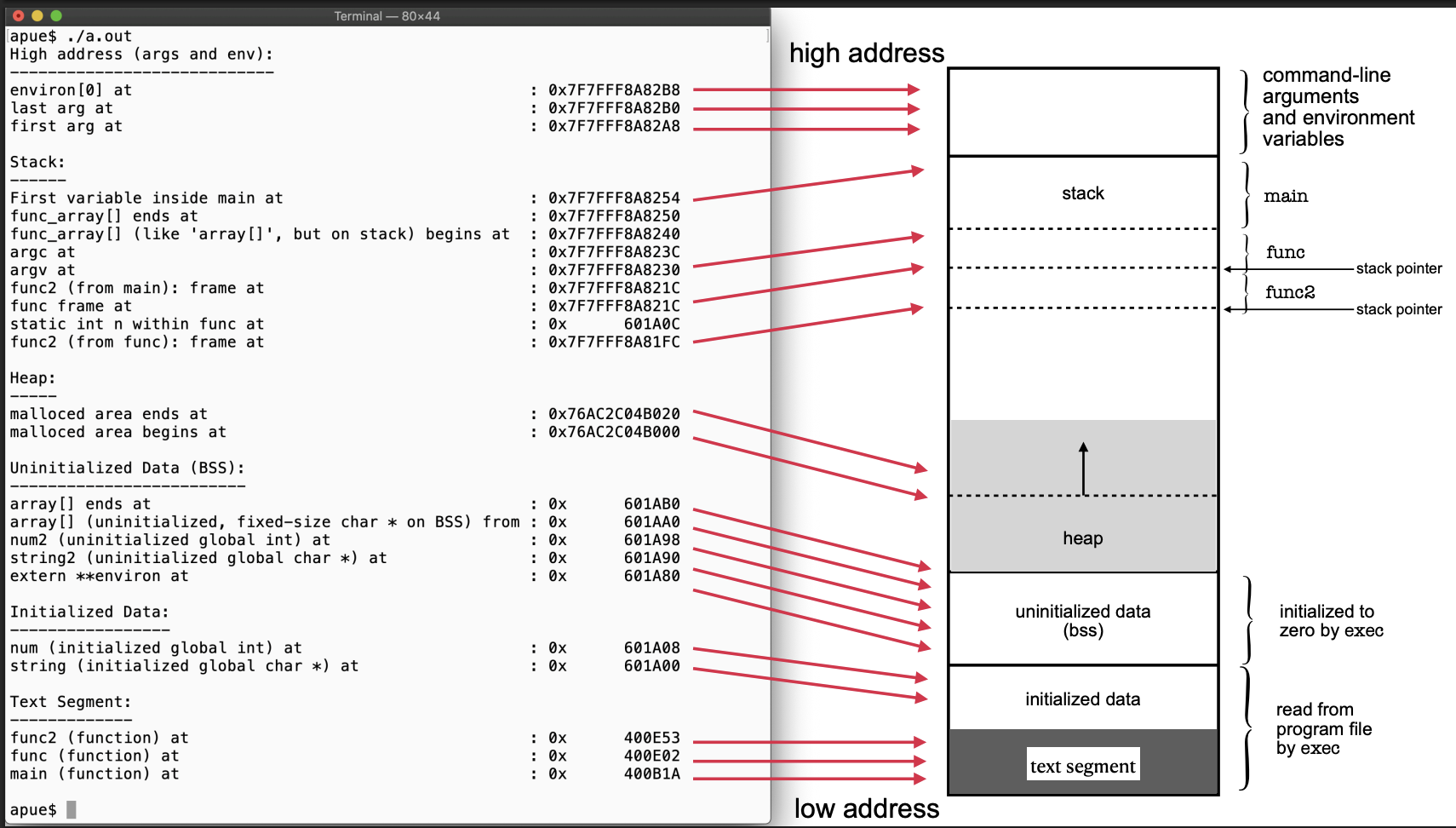
Week 6: Memory Layout of a Process
Let's talk about the details of a process. We start with a visual representation of a process in memory and create a program that prints out the addresses of different elements of a program and observe the alignment of the text, data, and bss segments as well as the placement of the heap and stack. We also illustrate what a stack overflow looks like.
Advanced Programming in the Unix Environment
Tool Tip: ed(1) is the standard text editor
As part of our discussion of unix development tools, we take a short detour to provide a quick walkthrough of ed(1), the standard text editor. This is not done merely to up your geek creds, but understanding ed(1) will also helps us better understand other tools like vi(1), sed(1), and ultimately even things like diff(1) and patch(1) better.
Advanced Programming in the Unix Environment
Week 5: Using gdb(1), part IV
In our last segment on gdb(1), we use the debugger to examine memory locations in a running program and illustrate how pointers and arrays work in the C programming language.
Advanced Programming in the Unix Environment
Week 5: Using gdb(1), part III
In this video lecture, we'll use our newly learned debugging skills to analyze and fix yet another flawed program. In the process, we learn to debug code from multiple source files and find out how to change the value of variables while the program is running.
Advanced Programming in the Unix Environment
Week 5: Using gdb(1), part II
In this video lecture, we continue to explore the capabilities of the debugger. We show how you can set a breakpoint to pause the program and how to step through the program while watching our code.
Advanced Programming in the Unix Environment
Week 5: Using gdb(1)
Alright, let's look at gdb(1)! We begin by using it to troubleshoot our failing programs and immediately identify the location of our program where it segfaults. We also see how to inspect variables and call functions from within the debugger.
Advanced Programming in the Unix Environment
Week 5: Debugging your code
Next in our discussion of the Unix _development_ environment, we start a short series on the use of a debugger by example of gdb(1). First, we illustrate just why exactly we might want to use a separate tool instead of sprinkling "printf" statements all over our code...
Advanced Programming the UNIX Environment
Our reference platform for this class is NetBSD. Some ways to get set up are:
Use an AWS image:
https://stevens.netmeister.org/615/netbsd-amis.html
Create your own AWS image:
https://www.netmeister.org/blog/creating-netbsd-ec2-amis.html
https://www.netmeister.org/blog/netbsd-amd64-ami.html
Install NetBSD on a Linode:
https://www.netmeister.org/blog/netbsd-on-linode.html
Use UTM / qemu:
https://stevens.netmeister.org/631/utm/
Advanced Programming the UNIX Environment
Some additional hints to set up your NetBSD environment for this class:
https://stevens.netmeister.org/631/vm-setup.html
With all sources extracted, familiarize yourself with ctags(1) et al to make browsing code a breeze:
Advanced Programming the UNIX Environment
Week 1: UNIX History
We cover the early days at Bell Labs, USL vs BSDi, the birth of the BSDs and Linux, and how we got from Ken Thompson playing "Space Travel" on a PDP-7 to Unix running on your phone, fridge, and TV.
Scroll along through it all here: https://www.levenez.com/unix/unix.pdf
Advanced Programming the UNIX Environment
Week 1: UNIX Basics
In this lecture, we provide a whirlwind tour of the Unix programming environment. In the process, we write a simple shell, a simple version of the ls(1) command, and two versions of the cat(1) command while learning about the Unix Philosophy.
Advanced Programming the UNIX Environment
Week 1: Introduction
This video covers a lot of the meta information (what do we do, why are we doing it, how are we doing it, syllabus, etc.). Some things have changed since I created the video (for example, we now have an AI policy: https://stevens.netmeister.org/631/use-of-ai.html), but most of it remains accurate.
Advanced Programming the UNIX Environment
Week 1: UNIX History
We cover the early days at Bell Labs, USL vs BSDi, the birth of the BSDs and Linux, and how we got from Ken Thompson playing "Space Travel" on a PDP-7 to Unix running on your phone, fridge, and TV.
Scroll along through it all here: https://www.levenez.com/unix/unix.pdf
Advanced Programming the UNIX Environment
Week 1: Introduction
This video covers a lot of the meta information (what do we do, why are we doing it, how are we doing it, syllabus, etc.). Some things have changed since I created the video (for example, we now have an AI policy: https://stevens.netmeister.org/631/use-of-ai.html), but most of it remains accurate.
It's that time of year again! The Fall semester is about to start, and I'm teaching "Advanced Programming in the UNIX Environment". The syllabus and all course materials including all code examples is available here:
https://stevens.netmeister.org/631/
All video lectures are public and available for free on YouTube:
https://www.youtube.com/@cs631apue/videos
If you want to follow along, I'll be posting lecture videos and related links in this thread throughout the semester.