
Discussion
Loading...

Post

Log in
  • About
  • Code of conduct
  • Privacy
  • Users
  • Instances
  • About Bonfire
Michael Jack
Michael Jack
@mjack@mastodon.bsd.cafe  ·  activity timestamp 2 weeks ago

I wanted to set up presence detection in Home Assistant without exposing my installation to the internet, and without giving the companion app on my phone access to location data.

I use MikroTik network gear at home, so I added the Mikrotik integration to Home Assistant. It showed my phone as a MAC address, connected through Wifi, and I used that as device tracker. Everything seemed fine, but then the next afternoon. the device tracker still showed me as Away.

I then discovered that GrapheneOS (edit: Android rather, see below) uses a different random MAC address for each connection to a network, as default. Changed it to use a static random MAC for my home network, and now it works as intended.

All this to avoid running the Morning Coffee automation if I'm not even home.
#homeassistant #mikrotik #grapheneos

https://www.home-assistant.io/integrations/mikrotik/

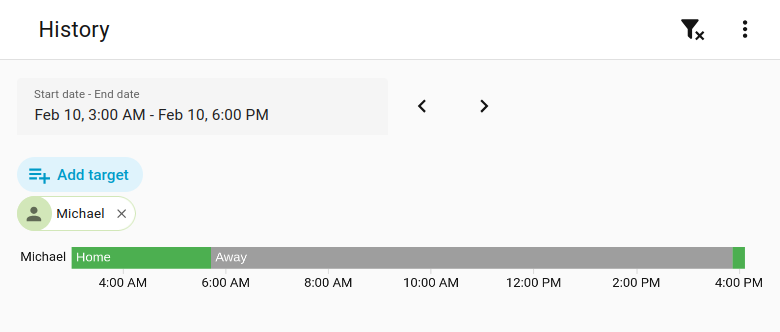
Screen shot from Home Assistant -> History for person Michael, showing me Home, Away, and then Home again. This matches my phone's connection to the home network.
Home Assistant

Mikrotik

Instructions on how to integrate MikroTik/RouterOS based devices into Home Assistant.
  • Copy link
  • Flag this post
  • Block

bonfire.cafe

A space for Bonfire maintainers and contributors to communicate

bonfire.cafe: About · Code of conduct · Privacy · Users · Instances
Bonfire social · 1.0.2-alpha.34 no JS en
Automatic federation enabled
Log in
Instance logo
  • Explore
  • About
  • Members
  • Code of Conduct