Discussion
Loading...

Post

  • About
  • Code of conduct
  • Privacy
  • Users
  • Instances
  • About Bonfire
اسماعیل محمّدنژاد 🇵🇸🇮🇷
@Just_Smile@persadon.com  ·  activity timestamp 3 weeks ago

@libreoffice@khiar.net @libreoffice@fosstodon.org
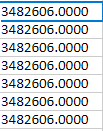
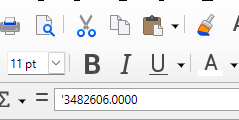
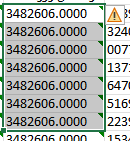
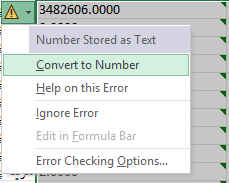
One of my biggest problems when working with #LibreOffice Calc (compared to #Microsoft #Excel) is that some software outputs data as Excel files where numbers are displayed as decimals. These files contain numbers that, when opened in LibreOffice, are shown only as decimals, and options like **Format Cells** or converting the cell data to numbers have no effect. You can’t even increase or decrease the number of decimal places. /1

Convert to number in Microsoft Excel
Displaying decimal numbers in Microsoft Excel and showing a menu beside cells
A single quote before numbers in the formula bar in LibreOffice Calc
Decimal Numbers on LibreOffice Calc
  • Copy link
  • Flag this post
  • Block
Log in

bonfire.cafe

A space for Bonfire maintainers and contributors to communicate

bonfire.cafe: About · Code of conduct · Privacy · Users · Instances
Bonfire social · 1.0.1-alpha.8 no JS en
Automatic federation enabled
  • Explore
  • About
  • Members
  • Code of Conduct
Home
Login