Discussion
Loading...

#Tag

Log in
  • About
  • Code of conduct
  • Privacy
  • Users
  • Instances
  • About Bonfire
Hacker News
Hacker News
@h4ckernews@mastodon.social  ·  activity timestamp 15 hours ago

Microsoft Mishandling Example.com

https://tinyapps.org/blog/microsoft-mishandling-example-com.html

#HackerNews #Microsoft #Mishandling #Example.com #Microsoft #News #Tech #Issues #Cybersecurity

Microsoft mishandling example.com

  • Copy link
  • Flag this post
  • Block
Neil Brown boosted
Matthew Slowe
Matthew Slowe
@fooflington@infosec.exchange  ·  activity timestamp last year

We recently created example.ac.uk to follow the same semantics as example.com but in the UK academic namespace. It's now reserved and available for anyone to use in documentation.

#highereducation #acuk #documentation #examplehttps://example.ac.uk

  • Copy link
  • Flag this post
  • Block
Aral Balkan
Aral Balkan
@aral@mastodon.ar.al  ·  activity timestamp 5 months ago

Coming soon (likely this afternoon, I’m writing tests and docs and updating examples as we speak)…

This is the sort of thing you’ll be able to do with Markdown pages. Just pop any arbitrary JavaScript you want in the new script block in the front matter and then import and use components as well as plain old JavaScript tagged template variable interpolation (not shown in this example) inside your Markdown.

The screen has all the code (sans the end of the last line of CSS and the closing tags for the

Screenshot: three windows: left side: Source of index.page.md, top-right browser showing running web app, bottom-right, source of Button and Reactions components.

Contents of windows:

index.page.md:

---
title: An interactive markdown page
script: |
  import Reaction from './Reaction.fragment.js'

  // Initialise database if necessary.
  kitten.db.reactions ??= {}
  kitten.db.reactions.Heart ??= 0
  kitten.db.reactions.Confetti ??= 0
  kitten.db.reactions.Smiley ??= 0

  let page

  export function onConnect (data) {
    page = data.page
  }

  export function onReaction (data) {
    kitten.db.reactions[data.type]++
    page.send(kitten.html`<${Reaction} />`)
  }
---
<page css>

# Hello!

While this is a __markdown__ page, I can easily layer interactivity by adding a simple component in a script block.

## Reactions{id=your-reactions}

<${Reaction} />

Browser (output):

Hello!
While this is a markdown page, I can easily layer interactivity by adding a simple component in a script block.

Reactions

Heart button: 5
Confetti button: 4
Smiley button: 3
Screenshot: three windows: left side: Source of index.page.md, top-right browser showing running web app, bottom-right, source of Button and Reactions components. Contents of windows: index.page.md: --- title: An interactive markdown page script: | import Reaction from './Reaction.fragment.js' // Initialise database if necessary. kitten.db.reactions ??= {} kitten.db.reactions.Heart ??= 0 kitten.db.reactions.Confetti ??= 0 kitten.db.reactions.Smiley ??= 0 let page export function onConnect (data) { page = data.page } export function onReaction (data) { kitten.db.reactions[data.type]++ page.send(kitten.html`<${Reaction} />`) } --- <page css> # Hello! While this is a __markdown__ page, I can easily layer interactivity by adding a simple component in a script block. ## Reactions{id=your-reactions} <${Reaction} /> Browser (output): Hello! While this is a markdown page, I can easily layer interactivity by adding a simple component in a script block. Reactions Heart button: 5 Confetti button: 4 Smiley button: 3
Aral Balkan
Aral Balkan
@aral@mastodon.ar.al replied  ·  activity timestamp 5 months ago

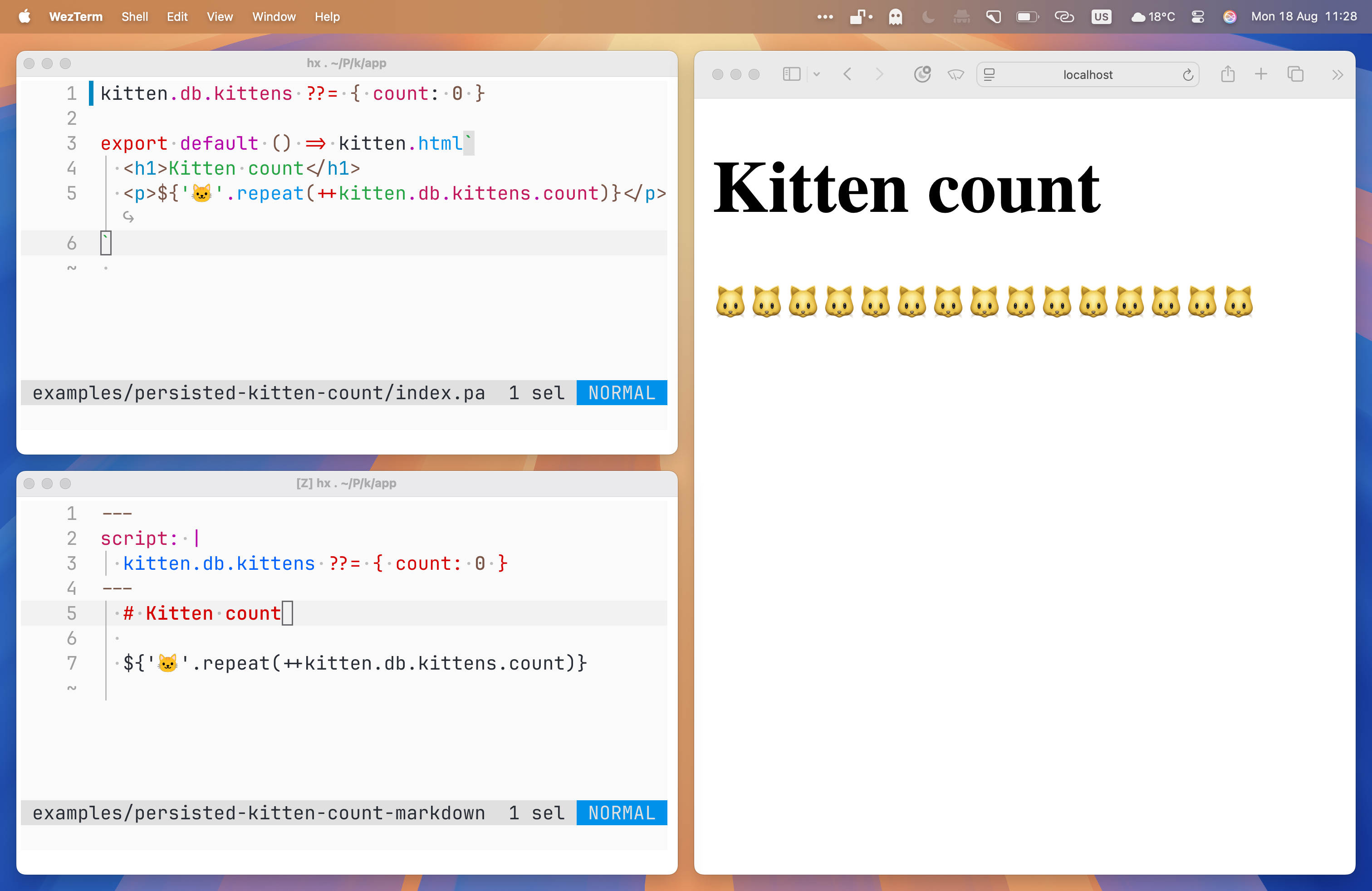
OK, so here’s likely the simplest possible example demonstrating:

• The same route, implemented as both a Kitten JavaScript Page (.page.js) and as a Kitten Markdown Page (.page.md)

• How to persist to the default Kitten JSDB¹ database.

(That first line with the nullish coalescing operator creates a “table” on the database with a default value for the count if it doesn’t already exist.)

https://kitten.small-web.org

¹ https://kitten.small-web.org/tutorials/persistence/

#Kitten #SmallWeb #web #dev #JavaScript #HTML #Markdown #example #comingSoon

Three windows: top-left, source of page.js version of Kitten count example, bottom-left, source of page.md version, and on the right, the output in a browser.

Top-left:

kitten.db.kittens ??= { count: 0 }

export default () => kitten.html`
  <h1>Kitten count</h1>
  <p>${'🐱️'.repeat(++kitten.db.kittens.count)}</p>
`

Bottom-left:

---
script: |
  kitten.db.kittens ??= { count: 0 }
---
  # Kitten count
  
  ${'🐱️'.repeat(++kitten.db.kittens.count)}

Right:

Kitten count (heading) and 15 🐱️ emojis.
Three windows: top-left, source of page.js version of Kitten count example, bottom-left, source of page.md version, and on the right, the output in a browser. Top-left: kitten.db.kittens ??= { count: 0 } export default () => kitten.html` <h1>Kitten count</h1> <p>${'🐱️'.repeat(++kitten.db.kittens.count)}</p> ` Bottom-left: --- script: | kitten.db.kittens ??= { count: 0 } --- # Kitten count ${'🐱️'.repeat(++kitten.db.kittens.count)} Right: Kitten count (heading) and 15 🐱️ emojis.
  • Copy link
  • Flag this comment
  • Block

bonfire.cafe

A space for Bonfire maintainers and contributors to communicate

bonfire.cafe: About · Code of conduct · Privacy · Users · Instances
Bonfire social · 1.0.2-alpha.5 no JS en
Automatic federation enabled
Log in
  • Explore
  • About
  • Members
  • Code of Conduct