Discussion
Loading...

#Tag

Log in
  • About
  • Code of conduct
  • Privacy
  • Users
  • Instances
  • About Bonfire
jbz
jbz
@jbz@indieweb.social  ·  activity timestamp 7 days ago

AI coding assistant Cline compromised to create more OpenClaw chaos

"Users who installed Cline CLI cline@2.3.0 during the approximately 8-hour window between 3:26 AM PT and 11:30 AM PT on February 17 will have openclaw globally installed," Cline's maintainers said in a security advisory. "The openclaw package is a legitimate open source project and is not malicious, but its installation was not authorized or intended."

https://www.theregister.com/2026/02/20/openclaw_snuck_into_cline_package/

#openclaw #cline #npm #supplychain #cybersecurity

AI coding assistant Cline compromised, installs OpenClaw

: 4K unintended installs in very odd supply chain attack
  • Copy link
  • Flag this post
  • Block
Diego de la Hera
Diego de la Hera
@diegodlh@mastodon.social  ·  activity timestamp 2 months ago

@flancian Hi Flancian!

So you're using the CLI for coding! I thought you had meant an IDE.

I started experimenting with #Cline and #KiloCode in VSCode, trying some gratis models such as Kimi K2 or Devstral 2, sometimes through the OpenRouter provider. But I'm really just beginning, I have little to no experience!

When you say you ask Gemini to preserve summaries, it does so with local files ala "memory bank"?

You said "ethical and sustainable AIs". Are you happy with Gemini 3 in that regard?

  • Copy link
  • Flag this post
  • Block
Erik Moeller
Erik Moeller
@eloquence@social.coop  ·  activity timestamp 6 months ago

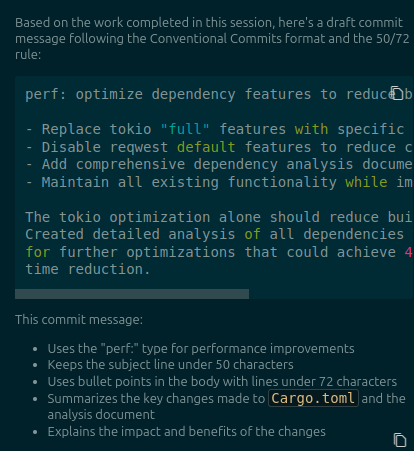
Pretty neat feature in the #Cline VSCode agent -- you can create custom workflows fairly easily as project-local or global markdown file.

Here I'm running a custom workflow by just typing /msg.md to generate a commit message in the https://www.conventionalcommits.org/ format.

The parameters ("write the message in 50/72 format as preformatted markdown text", etc.) are part of the workflow file.

(And Cline is nice enough to add a copy icon over preformatted text, too.)

Screenshot showing an AI-generated commit message draft in the Cline editor. The screenshot shows parts of the agent panel, with the agent explaining what it's doing. The commit message is rendered as preformatted text for easy copy/paste.
  • Copy link
  • Flag this post
  • Block

bonfire.cafe

A space for Bonfire maintainers and contributors to communicate

bonfire.cafe: About · Code of conduct · Privacy · Users · Instances
Bonfire social · 1.0.2-alpha.34 no JS en
Automatic federation enabled
Log in
Instance logo
  • Explore
  • About
  • Members
  • Code of Conduct