
Discussion
Loading...

Post

Log in
  • About
  • Code of conduct
  • Privacy
  • Users
  • Instances
  • About Bonfire
Erik Moeller
Erik Moeller
@eloquence@social.coop  ·  activity timestamp 6 months ago

Pretty neat feature in the #Cline VSCode agent -- you can create custom workflows fairly easily as project-local or global markdown file.

Here I'm running a custom workflow by just typing /msg.md to generate a commit message in the https://www.conventionalcommits.org/ format.

The parameters ("write the message in 50/72 format as preformatted markdown text", etc.) are part of the workflow file.

(And Cline is nice enough to add a copy icon over preformatted text, too.)
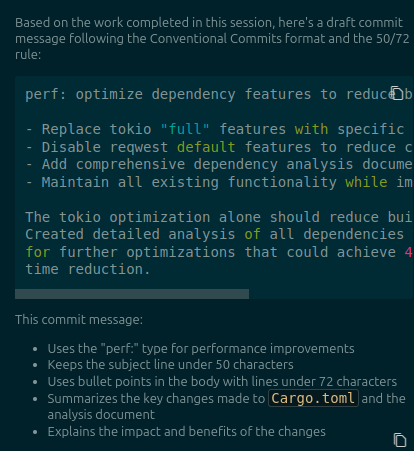
Screenshot showing an AI-generated commit message draft in the Cline editor. The screenshot shows parts of the agent panel, with the agent explaining what it's doing. The commit message is rendered as preformatted text for easy copy/paste.
  • Copy link
  • Flag this post
  • Block
Erik Moeller
Erik Moeller
@eloquence@social.coop  ·  activity timestamp 6 months ago

(It needs edits, but I guarantee it's a better start than what I would have written in this instance, which would probably have just been "optimize deps" or something :P)

  • Copy link
  • Flag this comment
  • Block

bonfire.cafe

A space for Bonfire maintainers and contributors to communicate

bonfire.cafe: About · Code of conduct · Privacy · Users · Instances
Bonfire social · 1.0.2-alpha.34 no JS en
Automatic federation enabled
Log in
Instance logo
  • Explore
  • About
  • Members
  • Code of Conduct