

43
Replies
·
0
Boosts


@Em0nM4stodon uhhh, how about a Palm Pilot?

@Em0nM4stodon would an e reader phone app work?
thanks for the reminder that i need to download an e reader app on my new Fairphone.😉 in Murena's app store are a number of e readers w/ long lists of features including yours, plus private, open source & free 😁


@Em0nM4stodon Xteink X4 fits almost all of those but the light. Most affordable of anything I think and smallest other than the Xteink X3.
I love my X4. Battery lasts forever. Ultra ultra portable. But for reading at home I got with a 6 inch Boox device.

@Em0nM4stodon
No eink ereader is backlit. They use front lighting.


@Em0nM4stodon @Hiro the XTEInk X4 has all that but backlight, it has a 4" screen and is like $45 on aliexpress, I love mine, I use it during commute all the time.
However you must not be afraid to tinker a bit as the official firmware is not the greatest, yet there are really good ones online like CrossPoint ( https://github.com/crosspoint-reader/crosspoint-reader -- upgrading is pretty much plug&play)


@Em0nM4stodon If the lack of an SD card is not a dealbreaker, another vouch for Kobo Clara (Colour). I've been using a Libra Colour (bigger model) completely offline since the day it was bought, and its internal storage is still mostly empty. No proprietary software needed, it's just a USB drive.
Do note that if it has a wifi connection, it does try to contact the mothership, but it's fairly easy to mod its software. I've done it just in case, but it spends its days offline anyway.
@Em0nM4stodon If the lack of an SD card is not a dealbreaker, another vouch for Kobo Clara (Colour). I've been using a Libra Colour (bigger model) completely offline since the day it was bought, and its internal storage is still mostly empty.
Do note that if it has a wifi connection, it does try to contact the mothership, but it's fairly easy to mod its software. I've done it just in case, but it spends its days offline anyway.


@Em0nM4stodon reasonably affordable is a matter of opinion but Boox Palma meets all the technical requirements you listed. I have such and I can recommend it. The only problem is rather old Android version so not all apps can be installed. Despite that I still like it and use a lot.


@Em0nM4stodon A Kobo fits most of that. The only thing it doesn't hit is the SD card, but my Clara HD does use an SD card for storage, albeit internally.
It does need to be set up with an account, however, it will happily stay offline, only ever taking epubs from Calibre, or just dragging them across with a file manager.
As for dark mode; mine doesn't have it natively, but it can be activated with a plugin called NickelMenu. Newer ones do have a native dark mode.

@Em0nM4stodon The fully offline forever requirement may be the real filter. A lot of phone-sized readers can work offline after setup but still assume accounts or app updates. I’d separate offline after setup from never needs network; otherwise the device may quietly fail the stability goal.

@Em0nM4stodon Sounds like you're after an Onyx Boox Palma. Second-hand, and it's also affordable.
@Em0nM4stodon As some people mentioned there are mobile apps like eBoox which was okay for me. Rakuten Kobo has a 6” model which might be slightly too big but I believe meets all the other requirements. I have the larger colour model and love it.
Edit: Older Kobos have SD card readers. New ones do not but books can be drag-and-drop transferred via a USB cable. (I had no issues doing this.)

@Em0nM4stodon Not what you're asking, but found this. Maybe it can be helpful
https://comparisontabl.es/e-readers/

I know this isn't what you're asking but I retired my eReader and now have ReadEra on my phone.
Does everything you're asking and it's free.
I am frequently without internet access and have my entire library on my phone's SD card.


@Jacquetta @Em0nM4stodon I would also recommend having a look at the Readest app (FOSS), which I really like.
@Jacquetta @Em0nM4stodon Oh, and if you go the "separate device" route I would also recommend the Xteink device mentioned by others. But be aware that only the current X4 has USB-C, the other model (X3) and future models that will soon come to market all seem to use a proprietary charging port. And also make sure you buy a version of the X4 that lets you install custom firmware. The "chinese version" you can buy from their website is locked down, and the custom firmware is so much better!
@Jacquetta Oh wow I am extremely loving the ReadEra app's privacy policy 🥰🔒
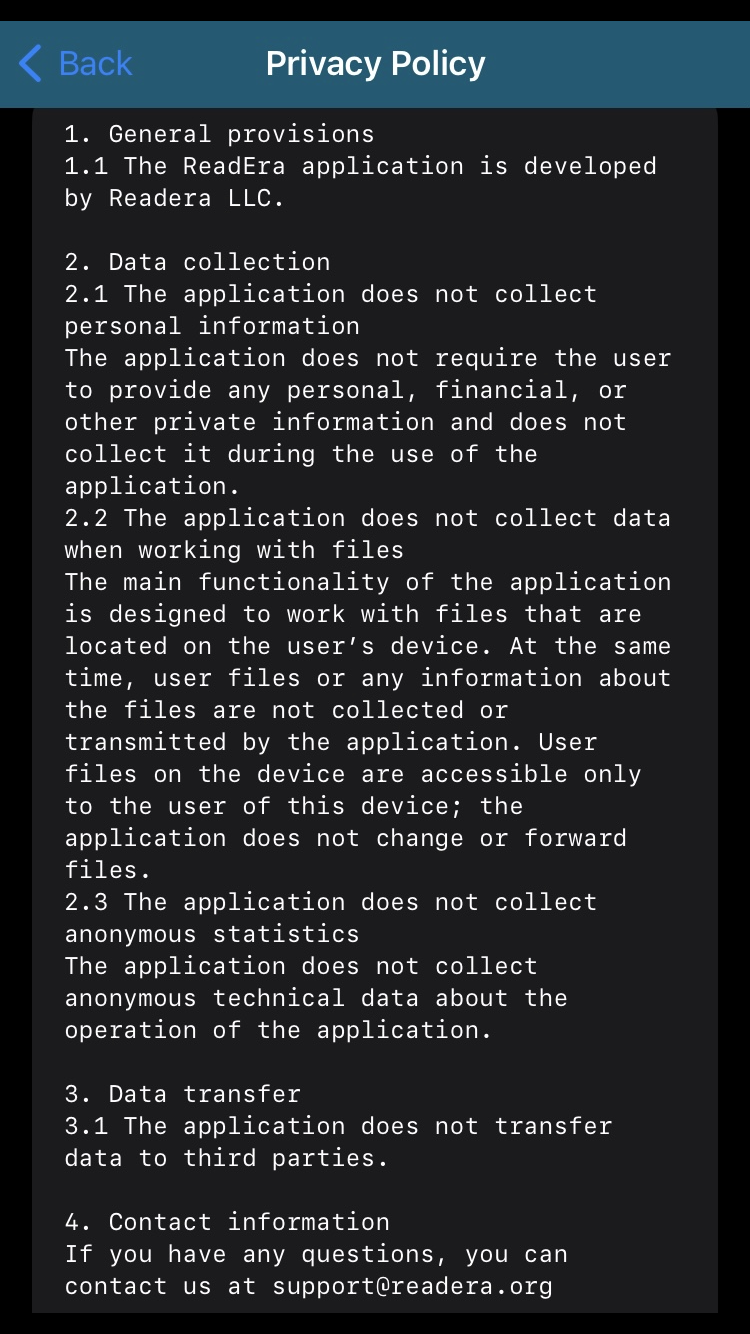


@Em0nM4stodon
Yes it is. A free and a paid one variant as well.
https://readera.org/
