

Hey #rsync experts! I have a large (100GB) Veracrypt partition that I often mount but rarely make changes to. However, it seems like the mere act of mounting this partition changes its mod date, such that rsync wants to recopy it, which takes a long time. How do I avoid this? I don't want to just ignore that file (because I do *sometimes* mod it). Nor do I want to back up its contents in the clear on the backup drive (I want to back up the encrypted partition blob). Ideas?
Post
Replies:
21


@pluralistic I suspect the problem is that the OS is tracking access time on the files/directories. Once you modify the record the entire encryption changes.
Mount the file system read only or use the noatime option to avoid that.

@pluralistic Could you mount the partition on your computer and on the backup drive and rsync between the mounts? The volumes wouldn't be bit-identical, but they'd have identical contents.

If it doesn't have to be rsync, as an alternative Borg Backup (open source) can do incremental backups that only consider the changes in a large file. It also has functionality to encrypt the backup parts that you upload to a remote location. (not necessary in your use case)
I used it to sync a 32GB production database backup to another country and it only needed to transfer a few 100MB every night.


@pluralistic
Knowing your mount options incl. filesystem within the encrypted container would help.
Somewhat wild guees: Many Filesystems are storing the time of last access of an file. This can be prevented by using "noatime" as mount option for the FS. Please have a glance at the manpage of your FS.
Also, you could mount the veracrypt container with " readonly" option, which should prevent all writes. Albeit writing to the container becomes less comfortable.
@pluralistic
The RSYNC way, without touching mount options:
rsync -avP --inplace --partial --checksum SOURCE SINK
Does[1] only partial transfers of changed blocks.
[1]Lets say should?! My tests were limited.
Please check with rsync manpage und don't trust strangers with you data :)
-avP Archive mode, verbose, Progress
--inplace don't create temporary copy (temp cpy would not contain old blocks which would provoke to full sync)
--partial block based
--checksum checksumming :)
@pluralistic
The --inline Argument introduces the chance of killing the data on SINK.
rsync with checksumming is going to eat CPU time, runtime and I/O.
Block based backup solutions with an Client-Server Architecture may improve the runtime.


What's the transport that you're using? If the remote end is also rsync and you're using the rsync protocol, it does a search to find changed blocks (this is described in detail in the author's dissertation and is quite a good read). But this requires the ability to run code on the remote end, rsync modes that don't have that option will fall back to copying the entire file.


@pluralistic "--partial --inplace" perhaps? Long time since I used that so don't remember exactly how it behaves.


The `--checksum` or `-c` flag will force rsync to do a proper checksum rather than looking at mod time or size. This takes longer but it's the best option for working with something like an encrypted file/container/etc.
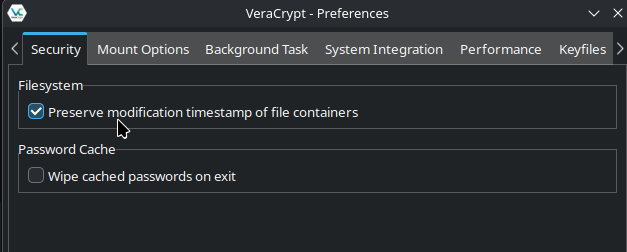
I also believe the "Preserve modifications timestamp of file containers" option in Veracrypt can be used for file-based containers to prevent it from updating the mod time in the first place. For security this is ideal, as it'll prevent the file from leaking the last time it was mounted.


@pluralistic 'rsync --exclude "mountdirectory" ' should do it with a separate process on rare occasions when it needs backup.


@pluralistic you did try to use rsync's --size-only flag? Then only actual file changes should trigger a transfer.
If you cannot be sure that writing changes the files size you can force rsync to always run a checksum (-c) but that of course is more work for rsync
@pluralistic Another thought: Depending on how often you write and if the checksumming of rsync is too expensive, you could just create the checksum when unmounting/writing to the container (using sha256 or such) ("sha256 -q FILENAME > hashfile.txt") and only trigger the rsync transfer of the veracrypt container if the hashfile differs from the one in the backup. Then you can save some hashing/disk stress etc.
@tante Sounds promising, but does this mean remembering to run the hashing command on the rare occasions that I do change the contents of the Veracrypt container?
Also, how would that conditional operate? Like a bash script that says, "If hashfile.txt has a lastmod date that has changed the since the last backup, then run rsync a, otherwise run rsync b (which includes an "exclude" string)?
Does this mean that I also have to have a file called lastmod.txt that is written if rysnc a runs?
@pluralistic You could have a script for mounting/unmounting the container that just includes that line so you never forget it.
Otherwise yes. You either have two different backup scripts based on whether "diff hashfile.txt /path/to/backup/hashfile.txt" is empty or not.
(the diff command would just check if the contents of the hashfile in the backup and the one on the live machine are different)
@pluralistic You could have a script for mounting/unmounting the container that just includes that line so you never forget it.
Otherwise yes. You either have two different backup scripts based on whether "diff hashfile.txt /path/to/backup/hashfile.txt" is empty or not.
(the diff command would just check if the contents of the hashfile in the backup and the one on the live machine are different)
You wouldn't need a "lastmod" file or anything else.
@pluralistic it is a bit of an extra step (like the veracrypt container would be omitted from the "normal" rsync process and have its own) but it's the best I can think of while using rsync
@tante The problem is that Veracrypt zero-pads the encrypted files, so the size won't ever change. And checksum is promising, but I'm backing up a 3/4 full 4tb drive and I'm guessing that calculating checksums on everything will be *very* time-consuming.
@pluralistic yeah that's why I think this might do it https://tldr.nettime.org/@tante/115615810166031033

@tante @pluralistic are you explicitly mounting the volume as read-only when you're not making changes to it? Have you tried keeping the file itself read-only so its mtime *won't* be updated? (Not 100% sure how VeraCrypt implements this specifically, but I have some general experience with similar issues with encrypted disk images.)


@tante @pluralistic this is also how I do it, and works when handling filesystems with different time precision, which can trigger unwanted transfers.

