Discussion
Loading...

#Tag

Log in
  • About
  • Code of conduct
  • Privacy
  • Users
  • Instances
  • About Bonfire
'(vidak) _(:3」∠)_ boosted

Le Bottin des Jeux Linux
@Le_bottin_des_jeux_linux@floss.social  ·  activity timestamp 2 weeks ago

🛠️ Title: Linux GPU Control Application
🦊️ What's: A libre tool for controlling your AMD, Nvidia or Intel GPU
🏡️ -
🐣️ https://github.com/ilya-zlobintsev/LACT
🔖 #LinuxTool #HarwareOptimization
📦️ #Libre #Arch #RPM #Deb #Flatpak
📕️ https://lebottinlinux.vps.a-lec.org/LO.html

🥁️ Update: 0.8.4
⚗️ Major release(Stable)🍎️
📌️ Changes: https://github.com/ilya-zlobintsev/LACT/releases
🦣️ From: https://masto.ai/@phoronix/115957310773977595

🕵️ https://www.youtube.com/embed/ceHsFTM35nE
🕵️ https://www.youtube.com/embed/nxQpuuB1yXY
🕯️https://www.youtube.com/embed/vYqHQZXkQGo
🕯️https://www.youtube.com/embed/mCL64-llo6c
🕯️[fr] https://www.youtube.com/embed/gK2uwdqqZV0
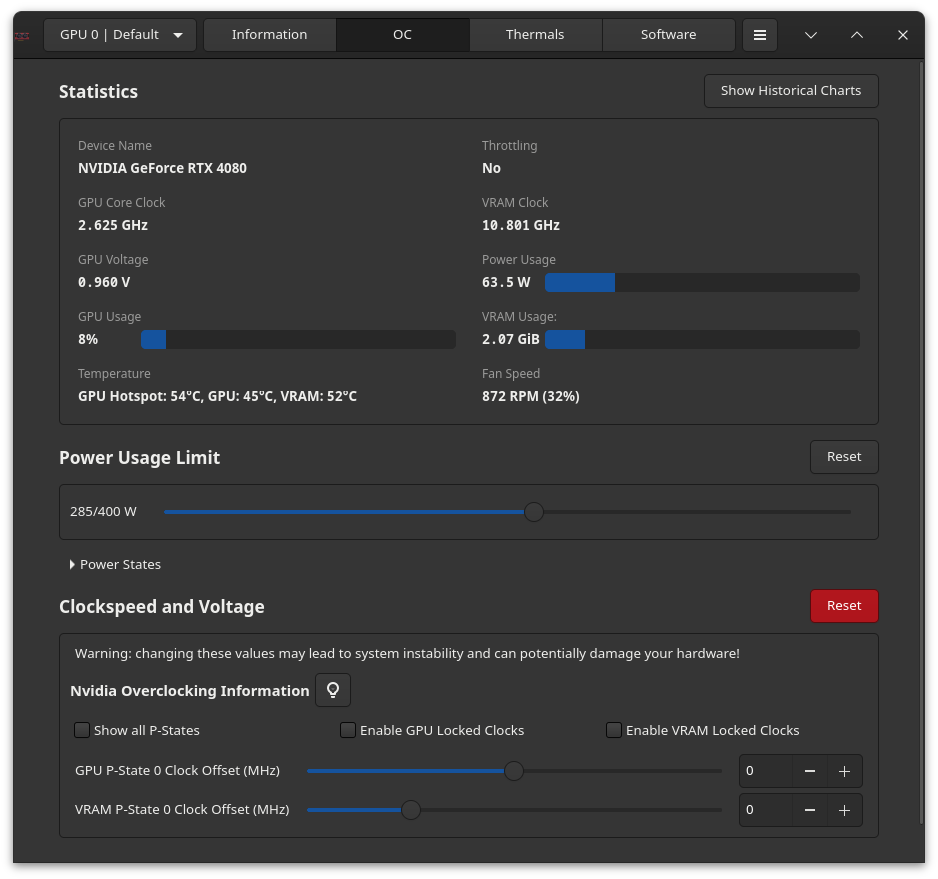
🕶️ A view of its user interface (v. 0.8.4, taken from the author's website). At the top, there are five buttons: Information (displaying information about the selected hardware), OC (the OverClocking menu, shown on screen), Thermals (to adjust the card's cooling), Software (some information about LACT and the current kernel), a sandwich menu button (for other settings), and a ‘Show historical chart’ button - very interesting, displaying the key curves of your graphics card).

📚️ Linux GPU Control Application is a libre tool for controlling your AMD, Nvidia or Intel GPU on a Linux system. Its features include GPU information display, power and thermal monitoring, power limit configuration, fan curve control (AMD and Nvidia), overclocking (GPU/VRAM clock speed and voltage) and power state configuration (AMD only), all independent of the desktop session (no dependence on X11 extensions). To be fully operational, it requires the installation of a background service (via systemctl).
🕶️ A view of its user interface (v. 0.8.4, taken from the author's website). At the top, there are five buttons: Information (displaying information about the selected hardware), OC (the OverClocking menu, shown on screen), Thermals (to adjust the card's cooling), Software (some information about LACT and the current kernel), a sandwich menu button (for other settings), and a ‘Show historical chart’ button - very interesting, displaying the key curves of your graphics card). 📚️ Linux GPU Control Application is a libre tool for controlling your AMD, Nvidia or Intel GPU on a Linux system. Its features include GPU information display, power and thermal monitoring, power limit configuration, fan curve control (AMD and Nvidia), overclocking (GPU/VRAM clock speed and voltage) and power state configuration (AMD only), all independent of the desktop session (no dependence on X11 extensions). To be fully operational, it requires the installation of a background service (via systemctl).

YouTube

YouTube

YouTube

YouTube

YouTube

GitHub

GitHub - ilya-zlobintsev/LACT: Linux GPU Configuration And Monitoring Tool

Linux GPU Configuration And Monitoring Tool. Contribute to ilya-zlobintsev/LACT development by creating an account on GitHub.

Le Bottin des Jeux Linux : light on / sous les projecteurs

Le Bottin des Jeux Linux / The Linux Games Book is a libre database in French and English listing 3900 Linux games and 900 tools (engines, emulators, ...), with useful links, help (to install certain games and tools), tests and videos.
  • Copy link
  • Flag this post
  • Block
Le Bottin des Jeux Linux
@Le_bottin_des_jeux_linux@floss.social  ·  activity timestamp 2 weeks ago

🛠️ Title: Linux GPU Control Application
🦊️ What's: A libre tool for controlling your AMD, Nvidia or Intel GPU
🏡️ -
🐣️ https://github.com/ilya-zlobintsev/LACT
🔖 #LinuxTool #HarwareOptimization
📦️ #Libre #Arch #RPM #Deb #Flatpak
📕️ https://lebottinlinux.vps.a-lec.org/LO.html

🥁️ Update: 0.8.4
⚗️ Major release(Stable)🍎️
📌️ Changes: https://github.com/ilya-zlobintsev/LACT/releases
🦣️ From: https://masto.ai/@phoronix/115957310773977595

🕵️ https://www.youtube.com/embed/ceHsFTM35nE
🕵️ https://www.youtube.com/embed/nxQpuuB1yXY
🕯️https://www.youtube.com/embed/vYqHQZXkQGo
🕯️https://www.youtube.com/embed/mCL64-llo6c
🕯️[fr] https://www.youtube.com/embed/gK2uwdqqZV0

🕶️ A view of its user interface (v. 0.8.4, taken from the author's website). At the top, there are five buttons: Information (displaying information about the selected hardware), OC (the OverClocking menu, shown on screen), Thermals (to adjust the card's cooling), Software (some information about LACT and the current kernel), a sandwich menu button (for other settings), and a ‘Show historical chart’ button - very interesting, displaying the key curves of your graphics card).

📚️ Linux GPU Control Application is a libre tool for controlling your AMD, Nvidia or Intel GPU on a Linux system. Its features include GPU information display, power and thermal monitoring, power limit configuration, fan curve control (AMD and Nvidia), overclocking (GPU/VRAM clock speed and voltage) and power state configuration (AMD only), all independent of the desktop session (no dependence on X11 extensions). To be fully operational, it requires the installation of a background service (via systemctl).
🕶️ A view of its user interface (v. 0.8.4, taken from the author's website). At the top, there are five buttons: Information (displaying information about the selected hardware), OC (the OverClocking menu, shown on screen), Thermals (to adjust the card's cooling), Software (some information about LACT and the current kernel), a sandwich menu button (for other settings), and a ‘Show historical chart’ button - very interesting, displaying the key curves of your graphics card). 📚️ Linux GPU Control Application is a libre tool for controlling your AMD, Nvidia or Intel GPU on a Linux system. Its features include GPU information display, power and thermal monitoring, power limit configuration, fan curve control (AMD and Nvidia), overclocking (GPU/VRAM clock speed and voltage) and power state configuration (AMD only), all independent of the desktop session (no dependence on X11 extensions). To be fully operational, it requires the installation of a background service (via systemctl).

YouTube

YouTube

YouTube

YouTube

YouTube

GitHub

GitHub - ilya-zlobintsev/LACT: Linux GPU Configuration And Monitoring Tool

Linux GPU Configuration And Monitoring Tool. Contribute to ilya-zlobintsev/LACT development by creating an account on GitHub.

Le Bottin des Jeux Linux : light on / sous les projecteurs

Le Bottin des Jeux Linux / The Linux Games Book is a libre database in French and English listing 3900 Linux games and 900 tools (engines, emulators, ...), with useful links, help (to install certain games and tools), tests and videos.
  • Copy link
  • Flag this post
  • Block

bonfire.cafe

A space for Bonfire maintainers and contributors to communicate

bonfire.cafe: About · Code of conduct · Privacy · Users · Instances
Bonfire social · 1.0.2-alpha.7 no JS en
Automatic federation enabled
Log in
  • Explore
  • About
  • Members
  • Code of Conduct