Discussion
Loading...

Discussion

Log in
  • About
  • Code of conduct
  • Privacy
  • Users
  • Instances
  • About Bonfire
Blackpixeldust Art
Blackpixeldust Art
@blackpixeldust@mastodon.art  ·  activity timestamp 2 weeks ago

And, I was mistaken when I tooted months ago that Blender3d has AI in it. I am admitting I was incorrect. IMO there should not be Gen AI in core Blender code EVER. The whole program's point is creatives creating.

So far, there are things like plugins made by users that may have AI in them. You could probably hook it up to AI with Python.

But anyways, I don't have the attention for long beginner videos. I never did that when learning as a teen.
#blender3d #gamedev

  • Copy link
  • Flag this post
  • Block
Blackpixeldust Art
Blackpixeldust Art
@blackpixeldust@mastodon.art replied  ·  activity timestamp 2 weeks ago

And, I was mistaken when I tooted months ago that Blender3d has AI in it. I am admitting I was incorrect. IMO there should not be Gen AI in core Blender code EVER. The whole program's point is creatives creating.

So far, there are things like plugins made by users that may have AI in them. You could probably hook it up to AI with Python.

But anyways, I don't have the attention for long beginner videos. I never did that when learning as a teen.

#blender3d #gamedev

  • Copy link
  • Flag this comment
  • Block
Blackpixeldust Art
Blackpixeldust Art
@blackpixeldust@mastodon.art replied  ·  activity timestamp 2 weeks ago

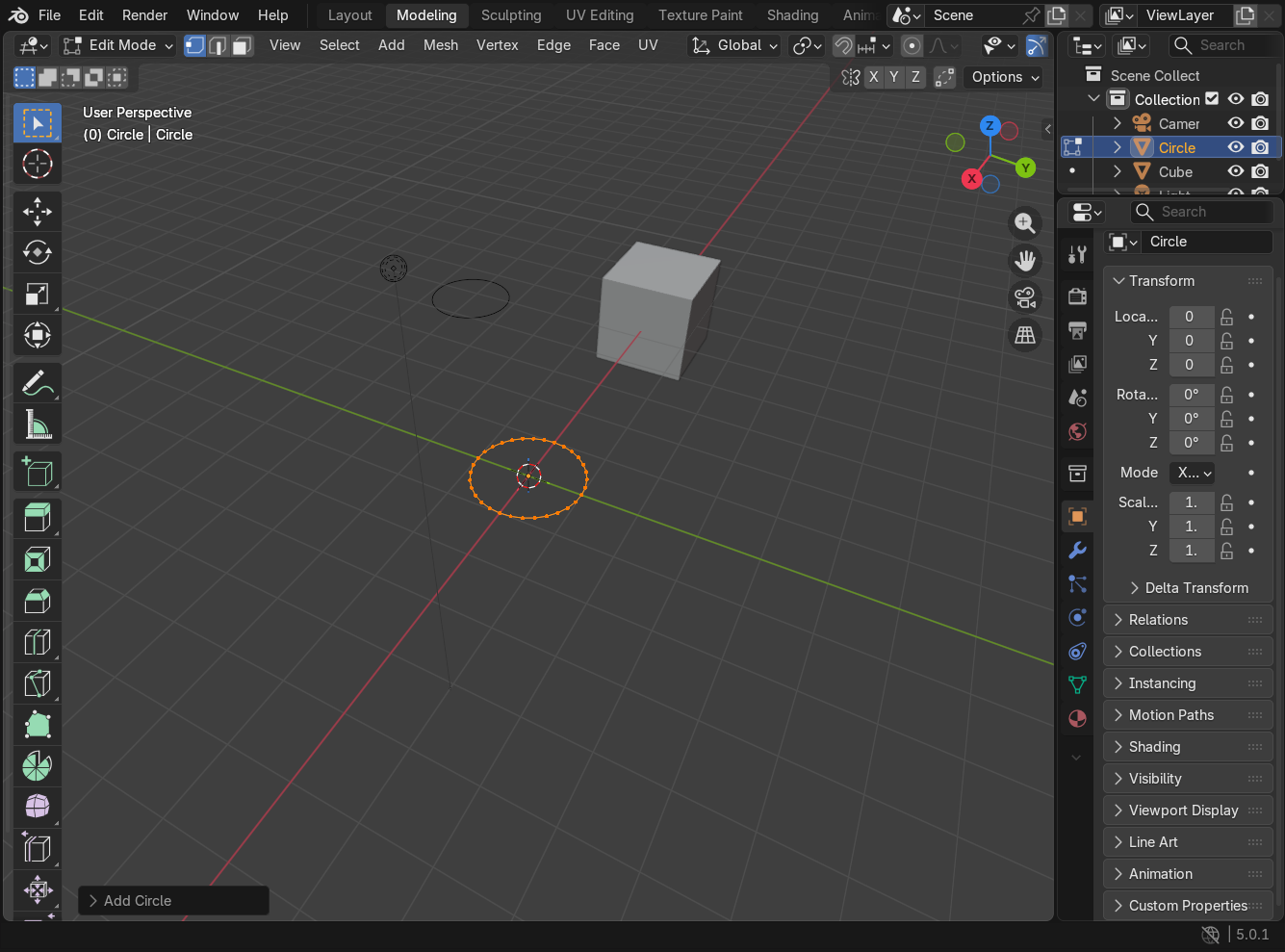
Here is a screenshot of what I'm looking at. The UI is far changed from what I'm used to. The highlighted ring in orange is what I want to modify. I haven't done anything except create the circle. The circle has 32 vertices and I want to decrease them down to like... 16? There used to be a menu that came with a new primitive mesh that did this.

I can't find it anywhere. I RTFM for Blender, yes.

#blender3d #gamedev

A grey 3d space with menus on the left, top, and righthand side of the screen. Listed on the right hand side of the screen are the properties of the circle mesh, but no place I can change the number of vertices.
The background is a light grey grid, and there is a cube and another circle on the screen.
A grey 3d space with menus on the left, top, and righthand side of the screen. Listed on the right hand side of the screen are the properties of the circle mesh, but no place I can change the number of vertices. The background is a light grey grid, and there is a cube and another circle on the screen.
  • Copy link
  • Flag this comment
  • Block

bonfire.cafe

A space for Bonfire maintainers and contributors to communicate

bonfire.cafe: About · Code of conduct · Privacy · Users · Instances
Bonfire social · 1.0.1 no JS en
Automatic federation enabled
Log in
  • Explore
  • About
  • Members
  • Code of Conduct