

@noybeu Oh, and on WhatsApp, you can't even turn it off... https://tuta.com/blog/how-to-turn-off-meta-ai
Discussion
Loading...
Discussion


@Tutanota @noybeu I agree people should get off Meta but for these who, for whatever reason (e.g. work or family etc. Use the following guide: https://www.avast.com/c-turn-off-meta-ai)


@Tutanota Nice - your right to object isn't an option in Canada. Plonkers.

@Tutanota @noybeu
Maybe going to
https://www.facebook.com/privacy/genai
short-circuits some of those steps?




@Tutanota does this impact Instagram to?



@Tutanota Care to specify where in their announcement they state that they’re going to start using PRIVATE messages to train AI (effectively breaking end-to-end encryption)?
Because from what I can read on your own blog post and on their announcement post is that they’re going to use PUBLIC data and interactions with Meta AI..





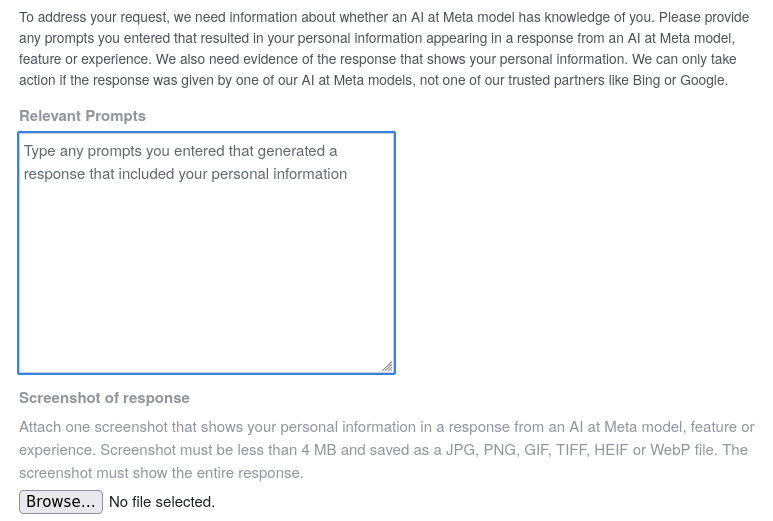
@Tutanota @noybeu thanks for the heads up. Here's how to do it on mobile:
- Navigate to Privacy Centre. On Facebook this will be under "settings and privacy". On Instagram this will be under "settings and activity"->"more info and support".
- In the privacy centre, search for "more detailed information about meta's generative AI models" and select it.
- Scroll down to "Your right to object", open and click "Learn more and submit requests here" which open the objection form.
- Do note that this form asks for yet more personal information about you, rather than just linking your objection with your account :/



@noybeu Oh, and on WhatsApp, you can't even turn it off... https://tuta.com/blog/how-to-turn-off-meta-ai





bonfire.cafe
A space for Bonfire maintainers and contributors to communicate
Automatic federation enabled