A Themes Catalog for Catodon, Misskey and Sharkey

Catodon 26.12 "Grumpy Cat" is coming together, entering feature freeze, and I want to talk about one new feature in particular: the Themes Catalog, a place to find, preview, install, star and publish looks for Catodon and the Misskey family. On Catodon it's built right in, so installing a theme is one click, with no copying code out of a post and pasting it into a settings box. Misskey and Sharkey users can use the catalog too, with a bit more manual work.
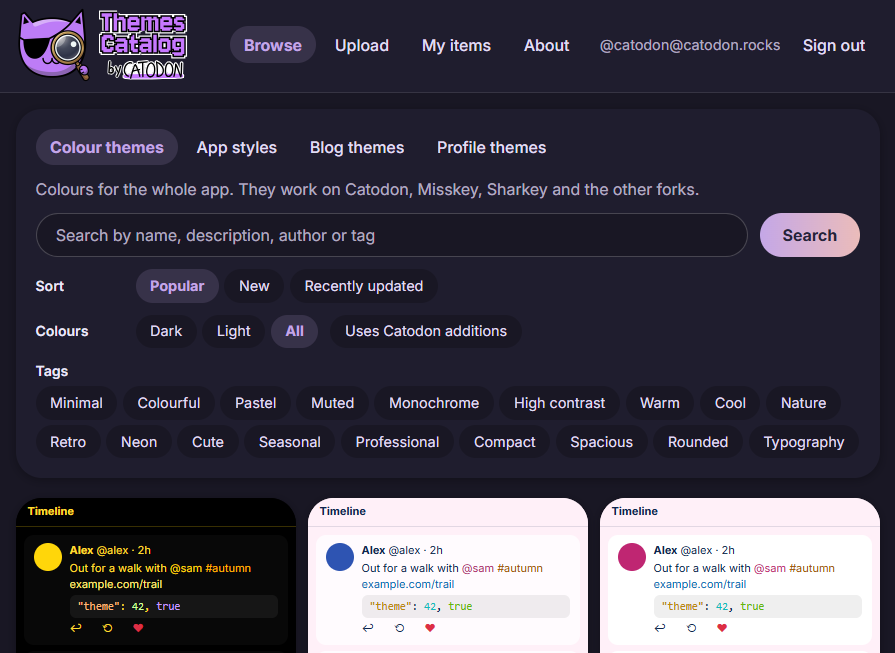
Four kinds of customization options
Colour themes: the themes you already know from the Misskey family, plus the extra layout options Catodon supports.
App styles: custom CSS for the whole web app - this applies only to how you view the interface.
Blog themes: Catodon now supports multiple blogs, and each can have its own look.
Profile themes: customize your profile page for all visitors to see, including on other Catodon servers. If that gives you retro, MySpace vibes - that's intentional!
Each kind has its own tab, filters and previews.
On Catodon: one click, no pasting
If you're on Catodon, you never need to leave your server! Just like with our Threadiverse Catalog, the Themes Catalog is built right in, so you can browse everything, install with one click, and manage your own themes. Updates are offered, never applied silently, so a popular theme can't suddenly be swapped for something nasty.
The catalog is also a standalone website at themes.catodon.rocks. Anyone can browse, preview, search, download and copy themes there with no account at all, and it works without JavaScript.
On Misskey and Sharkey
The catalog is for you too! Colour themes work on Misskey and Sharkey: install them with Misskey's own install link, or copy the theme into the theme editor. The colours come through everywhere, but the layout widths, corner radii and font stack that some themes carry only apply on Catodon. Extended colour slots are ignored on Misskey, and Sharkey applies some of them.
App styles work by copy and paste into Settings → Preferences → Custom CSS. Two caveats: on Misskey that setting applies to the current device only, and an app style is made for one version of one server, so it may break after an update.
Blog and profile themes need Catodon, because only Catodon has those features. The catalog also refuses themes that would break Misskey or Sharkey, so anything listed is safe to paste into either.
Your fedi account is your catalog account
There are no new accounts to create: your existing fediverse account is your identity. With it you can star, report and publish themes. Every item shows who uploaded it (a verified @user@host you can follow) and a free-text author credit. You can publish new versions of your themes at any time, as long as you can sign in to your fedi account.
On Catodon, you do all of this from inside the app. On Misskey, Sharkey and other forks, you sign in on the website with your own server's sign-in (MiAuth), which asks for read-only permission. On Misskey 2026.9.0 and later, the token is revoked immediately after sign-in. On other servers it can't be, so "Themes catalog" stays in your connected apps until you remove it.
Built to be safe
No addresses in catalog CSS. No remote images, fonts or data URLs, so a theme can't phone home or load unmoderated media.
Previews generated from the theme itself. There are no uploaded screenshots to maintain: the catalog renders a mock timeline, blog post or profile in the theme's own colours, in light and dark where available.
Checks as you publish. Kind, mode, target, Catodon-only features and text contrast (with a warning when text is hard to read against its background) are checked as you type. A licence is required: CC0, CC BY 4.0 (default), CC BY-SA 4.0 or MIT.
Visible moderation. Reports from 3 accounts on at least 2 servers hide an item until a moderator has looked at it.
Privacy by design. No IP addresses in logs, and Catodon servers talk to themes.catodon.rocks through your server's backend, so the catalog sees your server's hostname, not you.
The catalog is free and open source (AGPL-3.0, like Catodon), and has a public API.
I can't wait to see what people come up with, especially for blog and profile themes! But I'm also glad it can be useful to anyone on a Misskey-family server.
"Grumpy Cat" introduces many more major features: the location-based Nearby (we also submitted two FEPs for location based on this feature, FEP-0caa and FEP-e03f, to support standardization on fedi), Mastodon- and Loops-compatible Starter packs, Bookwyrm- and NeoDB-compatible reviews in the Library, Manyfold-compatible 3D prints, multiple, followable blogs per user, with a custom /b/blogname URL, and a "Remind me" option in posts, inspired by Reddit's RemindMeBot. But I wanted to give the Themes Catalog its own post, because it's such a fun and creative feature. You'll discover the rest in a few days, when it's released!
Panos, for Catodon