Discussion
Loading...

#Tag

  • About
  • Code of conduct
  • Privacy
  • Users
  • Instances
  • About Bonfire
Debby ‬⁂📎🐧:disability_flag:
@debby@hear-me.social  ·  activity timestamp 2 weeks ago

🗣️🎤📝 linux Speech to Text and Text to Speech on GNU/Linux disability_flag 📝🔊💻

Why This Matters to Me (and Maybe You Too)

If you’re anything like me—a Linux user who counts on voice typing and TTS because of visual impairment—you know that accessibility is not a luxury, it’s a necessity. Speaking from experience as someone who depends on voice typing (and TTS) , the quest for a seamless, local, FLOSS speech-to-text (STT) setup on Linux can be frustrating.
Here’s how you can succeed with modern tools using Linux. FLOSS means freedom and privacy; working locally means real control.
Let’s dive in! I’ll tell you what I’ve learned and what I use—and hope you’ll share your favorite tools or tips!

System-Wide Voice Keyboard: Speak Directly in Any App

Want to speak and have your words typed wherever your cursor is—be it a terminal, browser, chat, or IDE? Here’s what actually works and how it feels day-to-day:

- Speak to AI (Offline, Whisper-based, global hotkeys)
This tool is my current go-to. It uses Whisper locally, lets you use global hotkeys (configurable) to type into any focused window, and doesn’t need internet. Runs smoothly on X11 and Wayland; just takes a bit of setup (AppImage available!).
GitHub Repo https://github.com/AshBuk/speak-to-ai) | Dev.to Post https://dev.to/ashbuk/i-built-an-offline-voice-typing-app-for-linux-speak-to-ai-3ab5)

- DIY: RealtimeSTT + PyAutoGUI
For the true tinkerers, RealtimeSTT plus a Python script lets you simulate keystrokes. You control every step, can lower latency with your tweaks, but you’ll need to be comfortable with scripting.
RealtimeSTT Guide https://github.com/KoljaB/RealtimeSTT#readme)

- Handy (Free/Libre, offline, Whisper-based, acts as a keyboard)
I’ve read lots of positive feedback on Handy—even though I haven’t tried it myself. The workflow is simple: press a hotkey, speak, and Handy pastes your text in the active app. It’s fully offline, works on X11 and Wayland, and gets strong accuracy thanks to Whisper.
Heads up: Handy lets you pick your own shortcut key, but it actually overrides the keyboard shortcut for start/stop recording. That means it can clash with other tools that depend on major shortcut combos—including Orca’s custom keybindings if you use a screen reader. If your workflow relies on certain shortcuts, this might need adjustment or careful planning before you commit.
GitHub Repo https://github.com/cjpais/Handy) | Demo https://handy.computer)

Real-Time Transcription in a Window (Copy/Paste Workflow)

If you’re okay with speaking into a dedicated app, then copying, these options offer great GUIs and power features:

- Speech Note by @mkiol https://mastodon.social/@mkiol
FLOSS, offline, multi-language GUI app—perfect for quick notes and batch transcription. Not a system-wide keyboard, but super easy to use and works on both desktops and Linux phones.
Flathub https://flathub.org/apps/net.mkiol.SpeechNote | LinuxPhoneApps https://linuxphoneapps.org/apps/net.mkiol.speechnote/)

- WhisperLive (by Collabora)
Real-time transcription in a terminal or window—great for meetings, lectures, and captions. Manual copy/paste required to get the text to other apps.
GitHub Repo https://github.com/collabora/WhisperLive)

More Tools for Tinkerers

If you like building your own or want extra control, check out:
- Vosk: Lightweight, lots of language support. GitHub https://alphacephei.com/vosk/)
- Kaldi: Powerful, best for custom setups. Website https://kaldi-asr.org/)
- Simon: Voice control automation. Website https://simon-listens.org/)
- voice2json: Phrase-level and command recognition. GitHub https://github.com/synesthesiam/voice2json)

Pro Tips

- Desktop Environment: X11 vs. Wayland affects how keyboard hooks and app focus actually operate.
- Ready-Made vs. DIY: If you want plug-and-play, try Speech Note or Handy first. Into automation or customization? RealtimeSTT is perfect.
- Follow the Community: @thorstenvoice offers tons of open-source voice tech insights.

Screen Reader Integration

Looking for robust screen reader support? Linux has you covered:

- Orca (GNOME/MATE): The most customizable GUI screen reader out there. The default voice (eSpeak) is robotic, but you can swap it for something better and fine-tune verbosity so it reads only what matters.
- Speakup: Console-based, ideal for terminal.
- Emacspeak: The solution for Emacs fans.

💡 Orca is part of my daily toolkit. It took time to get the settings just right (especially verbosity!) but it’s absolutely worth it. If you use a screen reader—what setup makes it bearable or even enjoyable for you?

Final Thoughts

If you’re starting from scratch, try Handy for direct typing (just watch those shortcuts if you use a screen reader!) or Speech Note for GUI-based transcription. Both are privacy-friendly, local, and accessible—ideal for everyday Linux use.

Is there a FLOSS gem missing here?
Sharing what works (and what doesn’t!) helps the entire community.

Resources:
Speech Note on Flathub https://flathub.org/apps/net.mkiol.SpeechNote
Handy GitHub https://github.com/cjpais/Handy
Speak to AI Guide https://dev.to/ashbuk/i-built-an-offline-voice-typing-app-for-linux-speak-to-ai-3ab5
RealtimeSTT https://github.com/KoljaB/RealtimeSTT

#Linux #SpeechToText #FLOSS #Accessibility #VoiceKeyboard #ScreenReader #Whisper #Handy #SpeechNote #OpenSource #Community #voicetyping #LocalSTT #TTStools #SpeechRecognition #A11y #Linuxtools #Voicekeyboard #Whisper #Handy #speech-to-text #SpeechNote #review #ScreenReaders #ORCA #FOSS


VOSK Offline Speech Recognition API

Accurate speech recognition for Android, iOS, Raspberry Pi and servers with Python, Java, C#, Swift and Node.
Speech to Text and Text to Speech on GNU/Linux 
A diagram showing the flow of speech to text and back to speech on GNU/Linux, with microphone, text document, and Linux logo icons illustrating open-source voice tools flexibility. 

Quick Comparison Table:
 Which One Should You Try First?
| Use Case               | Best Tool               | Notes                                  |
--------------------------
| System-wide typing | Handy or Speak to AI     | Acts like a keyboard in any app.     |
| Real-time window   | Speech Note or WhisperLive | Copy/paste workflow.                  |
| DIY flexibility    | RealtimeSTT + PyAutoGUI | For those who love scripting.        |
Speech to Text and Text to Speech on GNU/Linux A diagram showing the flow of speech to text and back to speech on GNU/Linux, with microphone, text document, and Linux logo icons illustrating open-source voice tools flexibility. Quick Comparison Table: Which One Should You Try First? | Use Case | Best Tool | Notes | -------------------------- | System-wide typing | Handy or Speak to AI | Acts like a keyboard in any app. | | Real-time window | Speech Note or WhisperLive | Copy/paste workflow. | | DIY flexibility | RealtimeSTT + PyAutoGUI | For those who love scripting. |
  • Copy link
  • Flag this post
  • Block
Das_blaue_Pony
@Das_blaue_Pony@mastodon.social  ·  activity timestamp 4 weeks ago

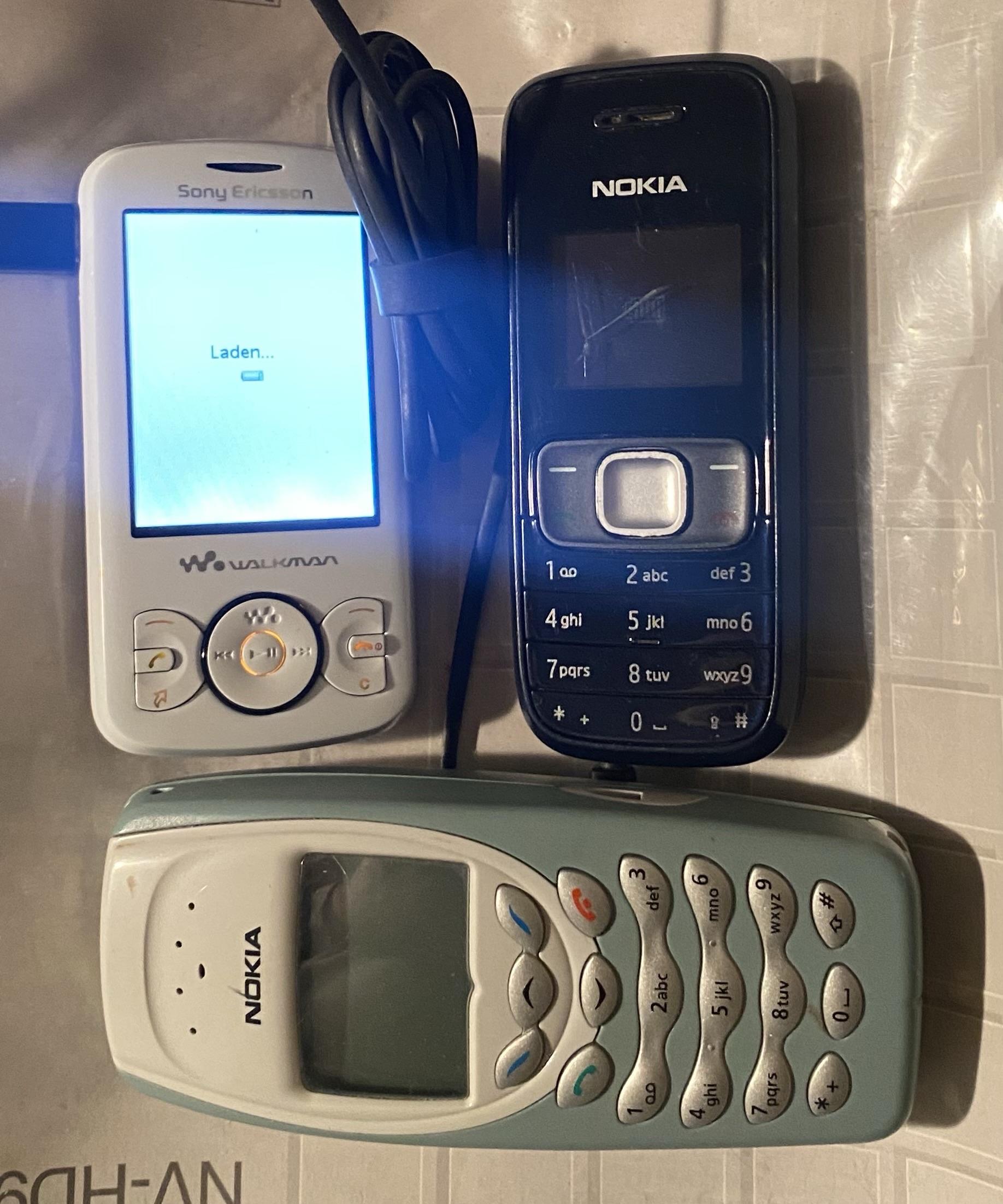
guckt mal was ich im Müll gefunden habe! Das Sony braucht nur ne MicroSD und ein Kopfhörer und man hat ein klasse MP3 Player. Die Nokias wollen irgendwie nicht mehr… gibts da draußen ein Bastler der die haben möchte? Ich meine die 2 Nokia den Sony Walkman Handy behalte ich. Bei dem kleinen Schwarzen ist sogar das Ladegerät mit dabei.
#Fedigive #Retro #Handy #Nokia #Loot #zuverschenken

Three vintage mobile phones are displayed: a Sony Ericsson Walkman with a charging cable, a black Nokia with an illuminated screen, and a light blue Nokia. The phones are placed on a textured surface.
  • Copy link
  • Flag this post
  • Block
Aktionsb. neue soziale Medien boosted
Federation Bot
@Federation_Bot  ·  activity timestamp last month

Sie kommen näher:
die bundesweiten #Aktionstage #Netzpolitik und #Demokratie der Bundes- und Landeszentralen für #politischeBildung @bpb .
Sie werden nächste Woche stattfinden und verschiedene Akteure wie das @DresdnerForschungswerk und andere haben bereits Veranstaltungen angemeldet
👉 https://netzpolitische-bildung.de/programm-2025

🗓️ Auch an der @tuberlin wird es am 11.11. einen #Mastodon-Workshop geben, auf dem sich alle Teilnehmer:innen die App gleich aufs #Handy laden und nutzen können
👉 https://blogs.tu-berlin.de/vereinigung_demokratiestaerken#:~:text=Mastodon
Veranstaltet wird er von unserem Aktionsbündnis in Kooperation mit der #TUB-Vereinigung „Demokratie stärken“.
Gebt das gern an alle Berliner:innen weiter, die die #App noch nicht nutzen.

#UnisInsFediverse #SaveSocial #WissKomm

https://blogs.tu-berlin.de/vereinigung_demokratiestaerken

Vereinigung Demokratie staerken

Bundesweite Aktionstage 2025

Programm der bundesweiten Aktionstage Netzpolitik & Demokratie vom 10. bis 15. November 2025
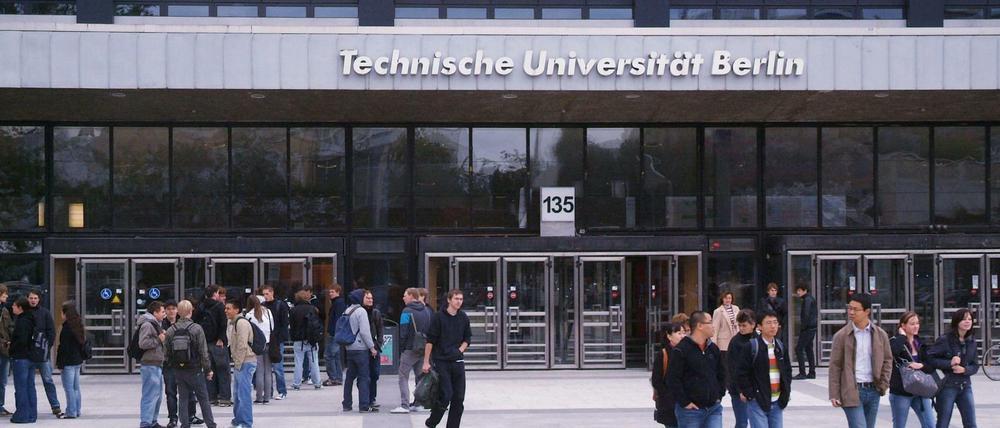
Das Bild zeigt das Eingangsportal der Technischen Universität Berlin in der Straße des 17. Juni 135 mit ca. 20 Personen davor. In dem Gebäude wird der Workshop stattfinden.
  • Copy link
  • Flag this post
  • Block
Aktionsb. neue soziale Medien
@neuSoM@bewegung.social  ·  activity timestamp 2 months ago

Vom 10.-14. November finden die bundesweiten Aktionstage #Netzpolitik und #Demokratie statt.

Sie werden von der @bpb und den Landeszentralen für politische #Bildung veranstaltet, und wer will, kann dabei noch mitmachen.

Es sind schon viele tolle Veranstaltungen geplant:
👉 https://netzpolitische-bildung.de/programm-2025

u.a. auch am 14.11.25 vom @DresdnerForschungswerk im Medienkulturzentrum in #Dresden: „Entdecke das #Fediverse“
👉 https://netzpolitische-bildung.de/veranstaltung/entdecke-das-fediverse

#Mastodon #SaveSocial #AlleInsFediverse

Entdecke das Fediverse!

Dein Weg zu mehr digitaler Selbstbestimmung, Datenschutz und Gemeinschaft online
1 more link(s)
Federation Bot
@Federation_Bot replied  ·  activity timestamp last month

Sie kommen näher:
die bundesweiten #Aktionstage #Netzpolitik und #Demokratie der Bundes- und Landeszentralen für #politischeBildung @bpb .
Sie werden nächste Woche stattfinden und verschiedene Akteure wie das @DresdnerForschungswerk und andere haben bereits Veranstaltungen angemeldet
👉 https://netzpolitische-bildung.de/programm-2025

🗓️ Auch an der @tuberlin wird es am 11.11. einen #Mastodon-Workshop geben, auf dem sich alle Teilnehmer:innen die App gleich aufs #Handy laden und nutzen können
👉 https://blogs.tu-berlin.de/vereinigung_demokratiestaerken#:~:text=Mastodon
Veranstaltet wird er von unserem Aktionsbündnis in Kooperation mit der #TUB-Vereinigung „Demokratie stärken“.
Gebt das gern an alle Berliner:innen weiter, die die #App noch nicht nutzen.

#UnisInsFediverse #SaveSocial #WissKomm

https://blogs.tu-berlin.de/vereinigung_demokratiestaerken

Vereinigung Demokratie staerken

Bundesweite Aktionstage 2025

Programm der bundesweiten Aktionstage Netzpolitik & Demokratie vom 10. bis 15. November 2025
Das Bild zeigt das Eingangsportal der Technischen Universität Berlin in der Straße des 17. Juni 135 mit ca. 20 Personen davor. In dem Gebäude wird der Workshop stattfinden.
  • Copy link
  • Flag this comment
  • Block
𝕂𝚞𝚋𝚒𝚔ℙ𝚒𝚡𝚎𝚕
@kubikpixel@chaos.social  ·  activity timestamp 2 months ago

»WLAN-Wellen reichen, um jeden auch ohne Handy zu identifizieren:
Forschende des Karlsruher Instituts für Technologie ( @KIT_Karlsruhe) haben gezeigt, dass sich aus gewöhnlicher WLAN-Kommunikation Bilder der Umgebung re­kon­stru­ieren lassen - und dass so Personen zuverlässig identifiziert werden können.«

Nicht die erste Meldung in dieser Richtung und ist den Wenigsten auch bewusst oder gar den Meisten egal.

🕵️ https://winfuture.de/news,154219.html

#kit #wlan #privatsphare #handy #bilder #identifikation #it

  • Copy link
  • Flag this post
  • Block
𝕂𝚞𝚋𝚒𝚔ℙ𝚒𝚡𝚎𝚕
@kubikpixel@chaos.social  ·  activity timestamp 2 months ago

@343max do you mean like that?!??

#alien #handy #mobilephone #signal #irony #humor #alsoonsignal #comic #mobile #joke #nerdjoke #messenger

A woman with a mobile phone in front of her eyes holding on to her like an alien.
  • Copy link
  • Flag this post
  • Block
der.hans
@lufthans@mastodon.social  ·  activity timestamp 3 months ago
@conservancy video session on "Phone freedom tips and related Q&A" is going on now

Info about loading FLOSS on Android from Director of Compliance

"about what's to come in the future of running your own software on Android"

https://bbb.sfconservancy.org/b/den-i3x-a5u-vkq

#conservancy#Android#BigBlueButton#BBB#Handy#FDroid

  • Copy link
  • Flag this post
  • Block
Log in

bonfire.cafe

A space for Bonfire maintainers and contributors to communicate

bonfire.cafe: About · Code of conduct · Privacy · Users · Instances
Bonfire social · 1.0.1-alpha.7 no JS en
Automatic federation enabled
  • Explore
  • About
  • Members
  • Code of Conduct
Home
Login